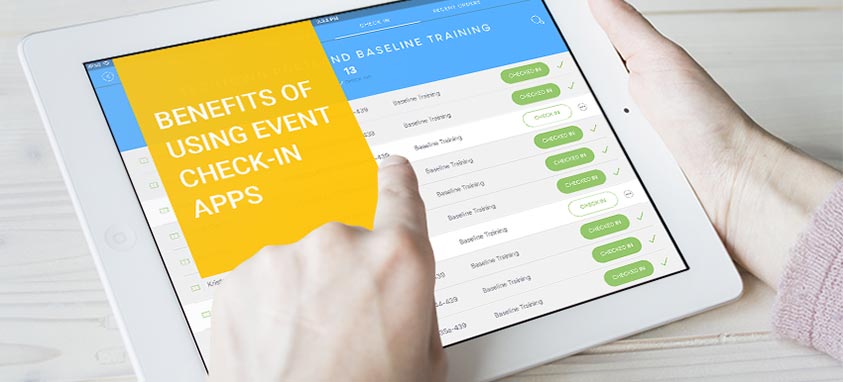
reasons to use event check-in apps

Event check-in apps are disrupting the events industry in a great way, and truly transforming the way industry professionals use technology to manage their events from start to finish.

According to the Losberger Group, one in four event professionals are using tablets to manage the registration process, while others are still playing catch up. New and exciting event apps provide a simple yet intelligent way to increase attendee satisfaction and event engagement, and streamline the process for event professionals.

As an event professional, you may ask yourself, “What are the benefits of using event check-in apps?” Let’s take a close look at the benefits of using check-in apps for events of all sizes.

5-Star Attendee Experience

Giving attendees an excellent event experience is one of the most important elements in making your event successful.  As the saying goes, “You never get a second chance to make a first impression.”

For an event, that experience starts at check-in. The traditional check-in process can be labor-intensive and time-consuming for both planners and attendees. Now, by using event check-in apps, event organizers and their guests have a solution for a fast, stress-free process.

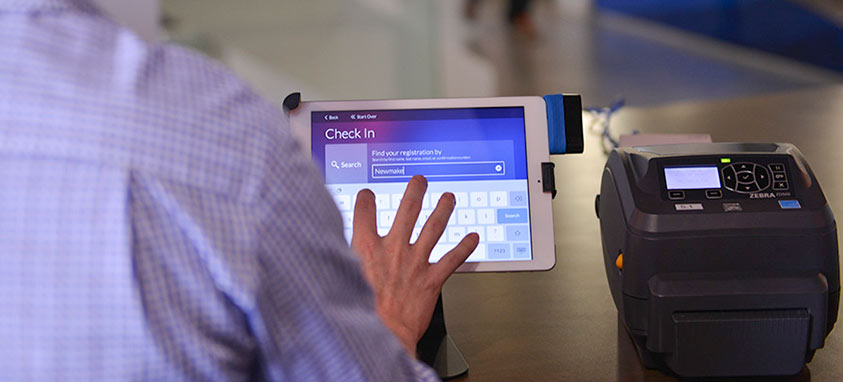
Events apps such as ImpactFlow Live allow you to look up guests by name or confirmation number, scan tickets, and view any pre-event responses or preferences in an intuitive format—all key elements to providing attendees with a five-star experience. Guidebook’s 2014 Event Tech Report notes that 88 percent of event professionals said using an event app had a positive impact on attendee satisfaction.

Go Green!

The average event professional plans more than 10 events per year. Yikes! That’s a lot of registration lists that are being printed on paper. The great thing about check-in apps is that among other things, they cut costs on printing and greatly reduce an event’s impact on the environment.

Have you ever worried about your list getting lost or attendees manipulating the system with paper tickets? Going green takes all those worries away. With all of your event information in the cloud, apps have never been safer.

In addition to streamlining the registration process, event check-in apps are the perfect tool for accommodating guests’ last-minute changes. Given the frequency of late requests by attendees, event professionals know that flexibility is key. Event check-in apps allow guests to make hassle-free last-minute changes to travel and lodging details, dining preferences, activity schedules and more.

Extra Team Member in the Palm of Your Hand…Literally!

Event technology can help increase productivity by 27 percent and decrease event costs by 20–30 percent, notes a study by Frost & Sullivan. Using a check-in app essentially allows event organizers to create an extension of their team, allowing them to accomplish more with less manpower.

You’ll also want to consider how an event check-in app can seamlessly connect with other technology that you may already be using. A great event check-in app provides a one-stop shop for event management and promotion, allowing planners to create a registration webpage, sell tickets, set pre-event questions, launch email promotions and complete on-site check-in—all in one integrated platform.

Real-Time Data

Event professionals clearly understand that real-time data is a major factor when executing an excellent event that knocks it out of the park and exceeds all expectations, rather than having just an average event. Of course, data is most valuable when you put it to good use. A useful event check-in app will give you real-time insight into the capacity of your event, an active guest count, details on when guests arrive and the ability to offer refunds on the spot.

Additionally, real-time data provides event organizers with greater insight into their event, helping them to make smart, data-driven decisions on the fly. This ensures that you always provide the best experience for your guest.

Never Miss an Opportunity to Increase Event Revenue

The days of carrying cash are long gone for many, especially millennials. Event attendees expect to make payments on the go using their debit or credit card. Having the tools to accommodate your attendee for unpaid balances or add-ons will allow you to cash in on every opportunity to make additional revenue.

The most innovative apps on the market today, including ImpactFlow Live, allow organizers to use a chip-enabled card reader that turns a tablet or mobile device into a box office. Simply connect to your device and swipe or insert a card into the reader to process secure payments right on the spot.

Out with the Old, in with the New!

If you are not already using an event check-in app or haven’t at least thought about it, you’re behind the curve. Soon it will no longer be a question of if you should be using a tablet or mobile app—it will be a question of “Which one are you using and why?”

The key to successfully choosing an event check-in app is to make sure it gives you the necessary tools to provide a five-star customer experience, increases productivity while decreasing overall costs and is flexible to your ever-changing event demands. You should always strive to provide an efficient, smooth check-in for your event attendees, so choose the app that works best for your events, team and company’s bottom line.


Armon Moore is ImpactFlow’s co-founder and chief creative officer. Moore, an expert at event technology, leads ImpactFlow’s design, brand marketing and growth teams.

SkyGuru provides real-time explanation and what to expect during your flight.
SkyGuru provides real-time explanation and what to expect during your flight

Meet Alex Gervash: an FAA and EASA licensed commercial pilot, psychologist, and now—app creator. Gervash is the director of Fearless Flying, a center dedicated to treating aerophobia, a condition which the National Institutes of Health estimates afflicts up to 40 percent of the population.

So after eight-plus years of treating patients with fears of flying, and observing more than 7,000 successful graduates of the program, Gervash gathered information from resources around the world to develop SkyGuru, an iOS app that uses smartphone sensors and a series of algorithms to literally talk users through the flight—even on airplane mode. So if you’ve ever thought to yourself, I would feel so much better about flying if I could just pick the pilot’s brain throughout the duration of the flight, you’re in luck.

How does it work? After a user has downloaded the app, they input the flight number into the app 24 hours before the flight is scheduled to take off. The app offers advice on the best seats for queasy travelers, analyzes weather conditions, calculates flight times, and explains dipping sensations, sounds and turbulence as they happen throughout the flight.

skyguru-screenshots

The app also predicts maneuvers on takeoff or landing based on current conditions to keep the user as prepared and in-the-know as possible, and can warn users of delays.  During stressful moments, such as during turbulence, the app sends reassuring messages, for example, “Control yourself rather than the airplane.”

The app can even answer questions users may have—such as why the lights in the cabin are blinking.

Gervash claims that the anxiety is often due to a simple lack of knowledge. “People need support during turbulence or with understanding a strange sound,” he told the Daily Mail.

The app was just released and costs $6.99 during launch period. The app’s cost will increase to $19.99.

live-stream-events crowd-streaming

Live-streaming apps like Periscope are taking over the social media landscape. Here’s how to leverage live-streaming to market your events, by getting your audience to do the legwork for you.

Social media is already a deeply ingrained part of event marketing, and it doesn’t seem to be going away anytime soon. But as more and more marketers jump on the social media bandwagon, it’s becoming more difficult for event organizers to make their content stand out among the clutter, and reach the audiences they’re attempting to target.

It’s becoming increasingly important for event organizers to get creative with their social media marketing strategies, and that includes staying on top of the trending social platforms and technologies.

One trend that you definitely don’t want to miss out on is crowdsourced live-streaming, or “crowd-streaming.”

The future of live-streamed content is here…and it’s here to stay

The live video streaming app Periscope currently has more than 10 million users–2 million of which are active daily–and more than 200 million broadcasts to date. While this is still small compared to Facebook’s 1.7 billion users, live-streaming apps like Periscope are still in the early stages of user adoption, and are growing quickly.

Crowd-streaming is live-streaming on a mass scale

Many tech-savvy event marketers are already using live-streaming apps like Periscope, Meerkat, Facebook Live, and even Snapchat to share their event with viewers. That’s great, but that’s also just one audience being reached.

Imagine if instead of just the event organizers live-streaming the event, the attendees themselves got in on the action. As an example, let’s say that even just one attendee decided to livestream your event, and that one attendee had 100 followers. That’s 100 people that now have exposure to your brand and your event, just because of that one attendee! Now, imagine the possibilities if 10, 100, or 1000 attendees all live-streamed bits and pieces of your event.

Welcome to the power of “crowd-streaming!”

Social media users crave crowd-sourced “behind the scenes” content

Whenever a brand is promoting their own product, service, or event on social media, there’s always a level of skepticism that audiences experience. After all, of course the brand behind the event is singing its praises…why wouldn’t it be? But when that message comes from one of their peers, users are much more likely to tune in and become engaged.

As an example, consider the exclusive New York Fashion Show. While 100,000 people actually attended the September 2015 event, 2.6 million watched via live-streaming. Although those viewers who didn’t actually attend the event didn’t bring any money to the event organizers, that’s still a huge win in terms of brand awareness, reach, social buzz, and potential attendees for future events.

By watching this peer-generated live-streaming content, viewers feel as if they’re getting an authentic insider-perspective, or a behind the scenes “sneak peek.”

How to inspire your attendees to livestream your event:

  • Include interactive elements. Attendees are much more likely to livestream events on their own when they’re able to be involved in the action in some way.
  • Invest in cool, unique, and exciting visual effects. Remember that people are more likely to share their experience if it makes it look like they are doing something fun and interesting.
  • Create your own event geofilter for Snapchat.
  • Keep some events a surprise. “Random” events that are funny, exciting, or unexpected are more likely to gain a share from attendees than those that are pre-scheduled.
  • That said, make sure your attendees are well-aware of major keynote speakers or performers, so they can be prepared to livestream those events.
  • Just remind them! Live-streaming is still relatively new in the world of social media, and many people may still be hesitant about using it. Encourage them to give it a try and make it as easy as possible for them to be successful by providing great content for them to share.

Rebecca Kennedy is a freelance travel writer.

security-apps-for-iphone-7

The new iPhone 7 comes with exciting new features: it’s now waterproof, has a longer battery life and a better camera, among other things. The new phone also comes with a convenient private data transfer – when a user acquires a new phone, their passwords, history of visited sites, information exchanged on messaging apps and other data are transferred from the old device to the new one.

Convenient as it might be, a new smartphone is now an attractive one-stop location for hackers, who’d like to access all the important information: personal bank account data, credit card passwords, name, address, social media accounts and so on.

What happens when someone’s personal information is stolen? According to Javelin Strategy & Research firm, one out of three times it’s used for identity theft. When someone’s identity is stolen, their money could be taken off their checking account or credit card at any time. Worst of all, most victims of identity theft are left to take care of the debts incurred, and to deal with a ruined credit.

It’s no coincidence that privacy and security apps have been rising in popularity among smartphone users. Here are security boosting tools for the iPhone 7:

Secure Messaging Apps

In order to communicate safely on a smartphone, Tor Messenger is a convenient solution. Tor Messenger is launched by Tor Project creators, who offer the world’s most popular encrypted Internet browser, synonymous with ‘the dark web.’ Tor Messenger is a cross-platform chat app that is secure by default and sends all messages over Tor Network. The app supports a good number of transport networks, such as IRC, Google Talk, Facebook Chat, Yahoo, and others, and enables Off-The-Record (OTR) messaging–a safe and encrypted way to have private conversations–over Tor’s network of computers for greater anonymity.

Signal is an encrypted messaging and voice calling app that provides end-to-end encryption to secure all communications. The app can also verify the identity of people one is messaging with and the integrity of the channel they are using. When texting with non-Signal users, one has an option to invite them to an encrypted conversation via Signal.

Password Security Apps

It’s always advised to change passwords in order to stay safe online, and that means having to use a unique password for each site or account. Those who work in teams, often experience a password issue: there are just too many passwords to remember for all the accounts, and it might feel like a full time job to keep every account secure. As a result, many people keep the same password for almost everything.

1Password for Teams (from the makers of the original 1Password) lets an entire team securely log in with only one single password, as the app remembers all the real passwords. The data is encrypted before any information leaves a device. A new product is 1Password for Families that allows a family to share passwords, credit cards, and other sensitive information. The app remembers everything, keeps the information safe and signs one into their favorite sites with one click.

Internet Encryption Apps

Those who aim to keep all their online activity private, should get a VPN for their phone. A VPN creates a connection tunnel that automatically encrypts all the data coming in and out of a device, secures the Internet traffic, and effectively protects anyone using the Internet. NordVPN (Virtual Private Network provider), which has a reputation of offering a military-grade protection, is fast and easy to use. The developers at NordVPN have launched a powerful new app for iPhone that is also intuitive and good-looking. The new iOS app re-routes and encrypts all Internet traffic making the connection private and secured while using top of the line security protocol IKEv2/IPsec.

Email Security Apps

Industrial espionage is getting more and more sophisticated, leading to billions in damages. That’s why everyone needs a secure app that will encrypt all emails. M for iOS, also known as Mynigma, is a strange-sounding app that evokes James Bond’s boss. The app provides automatic end-to-end encryption directly on the device, not in the cloud. It allows users to easily manage keys and can be used across devices.

The ZeroEmail App is a self-learning email app created to organize the inbox by relevance or importance. It has an original card-style format that allows for single swiping, making it quite fast and easy. Zero does not store messages and personal information on remote servers, meaning it all stays on the phone.

iPhone Data Security Apps

Keeply is a spy-level app for an average user. It stores a user’s private moments and data – pins, credit cards, notes, photos and videos – right on the phone. Although the idea itself is not particularly new, Keeply’s strong features make it a refreshing app. For example, it provides a Fake Pin feature, which is alternate password that the user can give to their nosy friends or family – when they enter it, the app shows an empty application. Face-down Lock, on the other hand, causes Keeply to close immediately when it’s placed face down. It can also take a photo of anyone who enters a wrong pin into the phone. Best of all: nothing ever leaves the phone. Besides, it’s aesthetically-pleasing and easy to use.

Paired Device Lock Apps

iPhone security apps can go one step further than smartphone’s protection – these apps can also save a user’s computer, remotely. When a user gets up from their desk and go for a coffee, they might suddenly remember that they have left their work computer with some private windows open. LockItUp app allows to simply lock a PC or Mac from anywhere by using iPhone. It’s all cloud-based, so there’s no need to be on the same Wi-Fi or network for it to work. The app runs in the background quietly and consumes very little CPU.

Another similar app is Knock 2.0: when a user wants to lock their Mac, they just need to pull out their iPhone and knock on it twice, even if it’s in the pocket. That’s all it takes. It’s ideal for Apple Watch users, too – after a fingerprint is provided, a user can lock or unlock their Mac with just one tap.

These are just a few of the many powerful new apps that are being launched to protect private information. They come right on time, as identity theft statistics grow all the time.

Each year, almost every person gets affected by at least one hacking attempt, and over a billion of personal records get accessed illegally. This year alone, hackers have broken into accounts of major public figures, such as Mark Zuckerberg, hijacked a computer network of Hillary Clinton’s campaign, stole $65 million worth of cryptocurrency from a Bitcoin exchange and accessed more than 330,000 cash registers at restaurants, hotels and stores.

If major public figures and companies are vulnerable to attacks, every user must make sure that at least the information that they can control–that is stored on their smartphones–is safe and secure.

facebook-events-app

According to Facebook, every day more than 100 million people use the social media platform to discover, share and keep track of events. Facebook events have long been a powerful resource for planners to display event information in one centralized location, promote events and interact with attendees before, during and after a meeting.

Now, a new standalone Events app will make those tasks easier and more effective for planners. Here are three reasons Events from Facebook is a valuable tool for meetings and events.

facebook-events-app-iphone

1. Improved communication with attendees
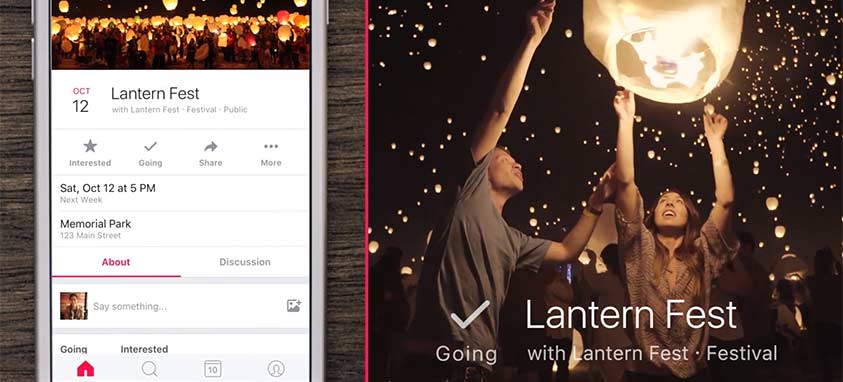
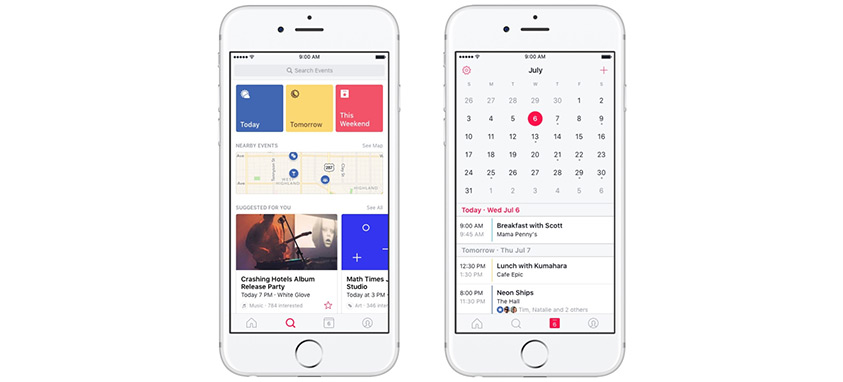
When users open the app, they see updates from events they are attending, recently announced events from pages they like and events their friends are interested in. Previously, these updates appeared alongside other posts in users’ timelines, making it easy for them to get lost in the mix. If you have an important update to send to attendees, this app makes it easier for them to see it.

2. Event promotion gets a boost
Events from Facebook has been designed to streamline attendees’ ability to discover new events. Thanks to the standalone app, your event can get improved visibility that is focused on a targeted, engaged audience that’s more likely to be interested in attending your event. The app’s recommendation tool suggests events for users based on time, location and interests.

3. A better way for attendees to keep track of events
The app introduces a calendar that lets users keep track of upcoming events that they are attending or interested in. What makes this tool especially useful is users can integrate personal or work calendars and view them alongside Facebook’s events calendar. The calendar simplifies scheduling by gathering all of the information in one place.

Delta Air Lines Mobile App

Maps are an integral part of travel, but for those flying with checked bags, being able to see a piece of luggage and its journey through the airport and from one plane to the next has been lacking. Delta Air Lines now offers customers a mapped view of their bag’s last scanned location. This week, baggage tracking information on the Fly Delta mobile app, allowing passengers to view the whereabouts of their belongings in real time.

The new map enhancement builds on Delta’s industry-first, system-wide launch of Radio Frequency Identification (RFID) bag tags and the roll out of RFID tracking technology at 84 airports in the U.S. All domestic stations now offer a map view of the bag’s journey. International stations will receive this technology in the coming months.

“We’re the first carrier to offer this level of visibility,” said Bill Lentsch, Delta’s senior vice president of airline operations and airport customer service for Delta. “From the moment our customers drop off their bag, we want them to know we’re looking out for it every step of the way and working to take the stress out of flying one innovation at a time.”

When a customer wants to see the location of their bag on the map, the display starts by showing a zoomed out map of the U.S. as the bag travels from one airport to the next. The map then automatically zooms to airport view. Users can follow their bag along its journey via pins, with the last known location identified by a suitcase icon. Tapping any of the pins or the icon will provide additional text information about the location of the bag.

Push notifications will sync with the app later this year and offer Delta customers down-to–the-minute updates on their checked baggage. It will also automatically update as flight details change.

road-trip-tips

Going on a road trip has its pros and cons. Pros, you’re going on an awesome adventure; cons, it can be costly. Here are some hacks you can try to balance those pros and cons to reach vacation nirvana.

1. Download a gas app

One of the most costly aspects of any road trip, especially in this economy, is gas. When you’re travelling in an unfamiliar area, it’s hard to know where to stop for the most frugal fill-up. To aid in your decision, you can download GasBuddy or Gas Guru, only two of the several gas pricing apps. These apps display the location and gas prices of gas stations near you. Most apps like these are free and update pretty regularly, so you won’t be deceived when you pull up at the pump.

2. Take side stops

Have you ever gone on a trip and passed signs for museums or monuments that you think would be awesome to see in person? Allot time in your travel to make a few stops on the way to your destination. It will not only keep you entertained throughout your trip, but it will also give you a chance to stretch your legs and learn something new.

3. Gassing up a rented or borrowed car?

Chances are, if you’ve never driven a car, you probably don’t remember which side the gas tank is on. If you do forget, look at the gas gauge. There is an arrow that will point to whichever side of the car the gas tank is on. This will save you a tiny bit of time and hassle when you have to stop at the pump.

4. How to stay awake while night driving

If you’re feeling sleepy, it’s probably best to switch drivers or check in to a hotel. But if you’re feeling only a little drowsy, try listening to comedians on your road trip. Odds are, the comedian will keep you laughing and their jokes will keep you engaged, chuckling and most importantly, awake, all the way home.

5. Know North from South

If you’re old school and like following paper directions instead of having a little square computer yell at you to turn, you know that your passenger might end up telling you a wrong direction by mistake. Remember that interstates and highways with odd numbers run North to South, and interstates with even numbers run East to West. If you get mixed up, this will help you get back on track, or at least in the right direction, in a jiffy.

6. Cool down hot cars quickly

In the dead of summer, stopping for only five minutes for a quick bathroom break can leave your car unbearably hot. To cool down a hot car in seconds, roll down one window all the way and open and close the car door directly across from that window a few times. This will force hot air out of the car.

7. Know where to get directions

When asking for directions, some people gravitate towards gas stations. However, the best place to ask for directions is a restaurant with a delivery service. Stop in at Pizza Hut or Dominos to ask for directions. Odds are, they have a driver waiting for a delivery who can give you quick and easy directions to a destination in the area.

With these seven road trip travel hacks, you’ll be ready to hit the road for the vacay of a lifetime.


For more tips on all things car related, visit Blitzify.com, check out our blog, and download the Blitzify app that is revolutionizing the way motorists search and shop for automotive services.

poken event technology

Held in London on Nov. 9, the third Event Technology Awards recognized industry leaders in event tech innovation. The awards dive deep into the world of event technology to cover a wide variety of categories, including Best Event App, Best Use of Gamification, Best Use of Technology for Engagement and Best Augmented/Virtual Reality Technology.

Winner for Best Use of Gamification is Poken, a valued partner of Smart Meeting events, which is best known for its NFC-powered interactive USB devices. Poken’s innovative USB sticks use NFC technology to enable event attendees to exchange contact information, essentially replacing physical business cards. Poken can also be used for event check-in and sharing digital content such as brochures and magazines.

With its built-in game engine, Poken offers a unique option for event gamification that encourages attendee engagement and participation. Live feeds can be displayed on the big screen to show leaderboards of the best networkers, most visited booths or most popular conference sessions. Poken works with meeting and event planners to customize gamification strategies to suit their objectives.

EventMobi and CrowdComms, creators of mobile apps for events, conferences and trade shows, took home the award for Best Event App. EventMobi recently launched a new product, Advanced Designer, which offers event planners even more control over the branding and design aesthetic of their event app. Most event app platforms offer some degree of customization, but Advanced Designer takes things to the next level by letting designers use CSS to make real-time changes to their event app.

Bizzabo, provider of all-in-one cloud-based event management and marketing solutions, received the People’s Choice Award for Favorite Event Technology Supplier. Planners love Bizzabo because of its powerful features, which encompass the entire event planning process. Event planners can use Bizzabo’s software to create event websites and registration pages, design event apps, manage email marketing campaigns and measure event success.

A partial list of winners is below. For the full list of award recipients, click here.

Best Event App EventMobi & CrowdComms
Best Use of Gamification Poken
Best Augmented/Virtual Reality Technology Pulse Group
Best Event Website/Mobile Site Attendease
Favorite Event Technology Supplier – The People’s Choice Award 1. Bizzabo
2. Xylobands
3. Shocklogic
Best Technology Start-Up LINEAPP GmbH
Best Use of Audio/Visual Technology Hawthorn
Best Use of Technology for Engagement Intergalactic & Eventbase

event-tech

2016 was a great year for innovation and advancement in meetings technology. Mobile apps for events are more powerful than ever, event management software does more than you can imagine, and new tools and gadgets for planners are entering the market each day.

Here are some of the most interesting and informative event tech stories from 2016, covering topics from essential meeting planning apps to robot concierges.

meeting planning apps for meeting planners

1. 7 Must-Have Apps for Meeting Planners
These days, there are so many apps for meeting planners to choose from, it’s hard to know which are really worth your time. We’ve selected a few that we think are great resources for planners.

virtual-meetings

2. 12 Tech Tools for Virtual Meetings
In the past, virtual meetings were often cumbersome, awkward, difficult to implement and prone to technical difficulties. But in the age of globalization, virtual meetings are becoming a necessity for many companies. These tools will help your virtual meetings run more smoothly.

opener

3. Tech Behind the Scenes: How Technology Enhances Events
With each passing day, technology is becoming more important to meeting and event planning. From high-tech venues with modern audiovisual equipment to super-powered mobile event apps and cloud-based event management and analytics software, we break down all the ways tech enhances events.

cvent-onarrival-kiosk-event-registration-and-check-in-apps

4. 5 Cool Tech Tools for Event Check-In and Registration
Attendee check-in and registration processes are often hectic, time-consuming and stressful. With high-tech mobile check-in kiosks, powerful event management tools and more, these apps and gadgets are here to make planners’ lives easier.

Event Planning Problem Solvers

5. 5 Digital Event Planning Problem Solvers
These clever digital problem solvers can assist planners with a range of needs, including speaker sessions, audiovisual needs, event management and more.

Business Travel Apps

6. Travel Smart with These 10 Innovative Business Travel Apps & Services
Whether you’re a planner embarking on a site visit or sales representative meeting with clients, these innovative travel apps can make trips easier to plan, more enjoyable and more productive.

hospitality tech trends

7. 5 Hospitality Tech Trends Taking 2016 by Storm
Digitally enhanced hotels, smartphone room keys and super intelligent robot concierges are just a few of the amazing innovations that graced the hospitality industry over the past year.

travel apps by celebrities g.spotting

Once you’ve really made it big, you expand your brand, typically by opening a restaurant or launching a clothing line or self-titled fragrance. Add travel apps to that list. It may seem like an odd business to go into, but the trend appears to be picking up steam.

G. Spotting

Actress Gwyneth Paltrow’s company Goop recently launched a new travel app, G. Spotting, that provides users with a closely-curated guide to 25 cities around the world, including recommendations for restaurants, hotels, art museums and other services, recommended by the Academy Award-winning actress, her friends and her Goop team.

The app isn’t just geared toward tourists. Noora Raj Brown, vice president of communications at Goop, explained that the app is also built for locals looking to test out a new spot for dinner in a different neighborhood. Other celebrities lent their preferences for certain destinations, such as Reese Witherspoon, who added her two cents for Nashville recommendations.

Detour

Andrew Mason, the former CEO of deals site Groupon, recently launched a travel app of his own, Detour. The app offers hour-long audio tours of certain neighborhoods in touristy cities such as New York, San Francisco, Los Angeles and Chicago.

The fun part of the app is the narration. Audio tours are given by some familiar names and voices, such as filmmaker Ken Burns, Broadway legend Joel Grey and local radio personalities, designed to make users feel like they’re getting a tour from a local celebrity.

Detour is a free app for Apple and Android devices, but the tours sell for $4.99 each.

ChefsFeed

Can you think of anything better than being advised where to eat by famed culinary heavyweights? The ChefsFeed app does exactly that—providing exclusive details about where and what you should eat with curated, chef-recommended guides.

The app lets users search by dish and location, and provides not only restaurant recommendations, but specific dish recommendations.  Members of the chef-community that provide feedback range from big names such as Wolfgang Puck, to local esteemed chefs from around the United States.