social media engagement for events

By this stage of the game, almost all meeting professionals are using social media in some fashion and degree in conjunction with events. But do you have a strategy? Are you using all the resources at your disposal.

During Florida Encounter Nov. 30-Dec. 2 at Omni Orlando Resort at ChampionsGate, social media guru Alex Plaxen shared his insights to help planners kick their social media games up a few notches. Plaxen, founder and president of Little Bird Told Media, reminded those in attendance to always keep “FOMO” in mind. If you can create a “fear of missing out” among those who maybe weren’t planning to attend your event, you may be able to get a few last-minute registrations and enhance reputation for future events.

6 Phases of Social Media Before, During and After Events

1. Start by developing a strategy based on data from previous events, including group identities and target markets. Analyze that data to gain insights that will be helpful in directing your social media campaign.

2. Build momentum, starting about two to six months before your event. This phase is content driven. The more fresh content you create, the more momentum will surge.  Among the possible contents items that can help you build momentum are announcements regarding deadlines, speakers, receptions and recaps from the previous year’s event.

3. High volume touch points are reserved for two weeks before your event. This is the time speakers can really help you promote the event, including a sneak peek video with the keynote. Encourage speakers to use their own social media accounts to promote your event. Website components may include countdowns and a timelapse video of the trade show floor. Don’t forget to monitor your hashtags and if attendees are tweeting out, make sure to acknowledge them. “It goes a really long way,” Plaxen says.

4. The main event is obviously critical, so appoint one person to stay on top of posts and respond to complaints. (Plaxen says this person should NOT be your intern.) Because social media is the “new help desk,” event planners can show their social media savvy by responding to posts quickly and with aplomb. “People are okay with things not being perfect. They want authenticity,” Plaxen says. Media walls are a great way to track all the great photos attendees are posting. And make sure to take a few minutes at the start of the conference to remind participants about your hashtag and let them know why they should use social media tools during the event.

5. As a post-event follow-up, thank everyone who posted on social media about your event. A simple retweet or reply with “Hope you had a great time!” will show you care and  actually paid attention to their posts.

6. Plan to reward top social media users with a small gift. If you let attendees know you’re having a contest, there’s incentive to stay active on social media.

become a social media marketing expert

Social media is a constantly evolving medium that’s used all over the world in every market. Every business should be using social media to their advantage, whether to spread news or share products and boost sales, but when it comes to deciding which platforms to use and how, there are five distinct social media outlets that stand out.

Skilled.co compiled a comprehensive infographic that illustrates a whopping 115 facts about social media. We’ve boiled it down to the most interesting and top need-to-know data for businesses.

si-1

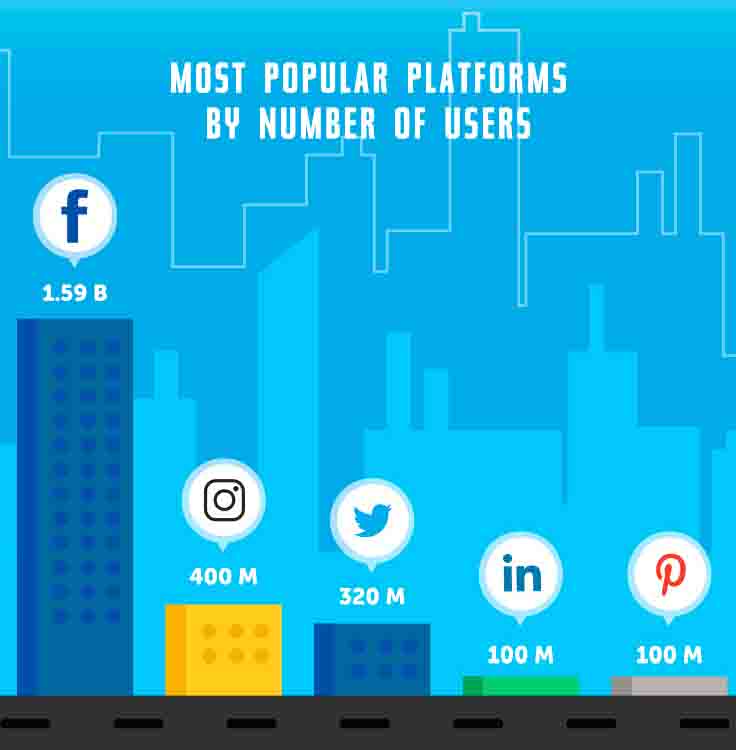
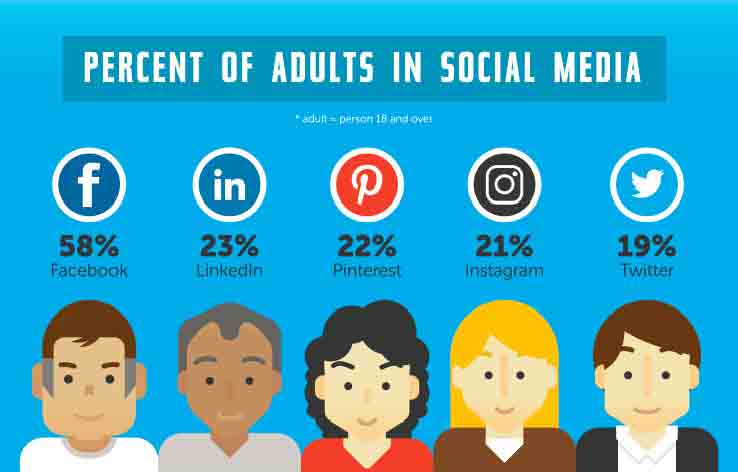
Most people know that Facebook is the most widely recognized and widely used social platform–but seeing how it ranks beside its competitors is remarkable.

si-2

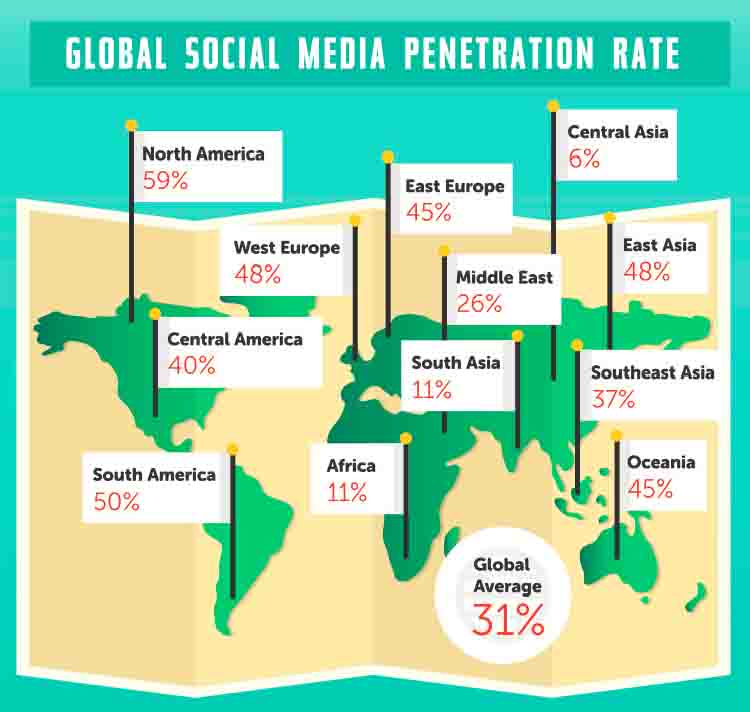
Understanding where these platforms are being adopted and used should have an affect on decision-making, especially if your target audience is international or even global.

si-3

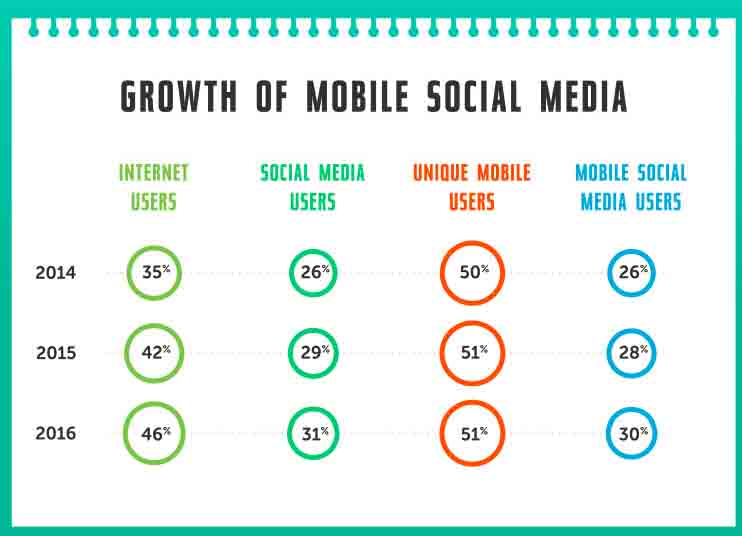
Knowing your audience demographic these days goes far beyond knowing physically where they’re coming from. How they’re accessing your content or website has an affect on how they’re seeing that data, how long they’re remaining on the site, etc.

si-4

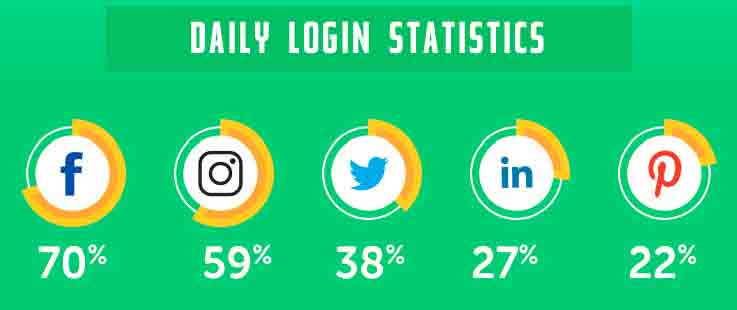
If you’re updating your company’s LinkedIn postings daily, and your Facebook posts weekly–this data may change your tune (and social media strategy). However…

si-5

…keep in mind who your target market is. The 18+ crowd is using apps like Instagram and Twitter less than teens do.

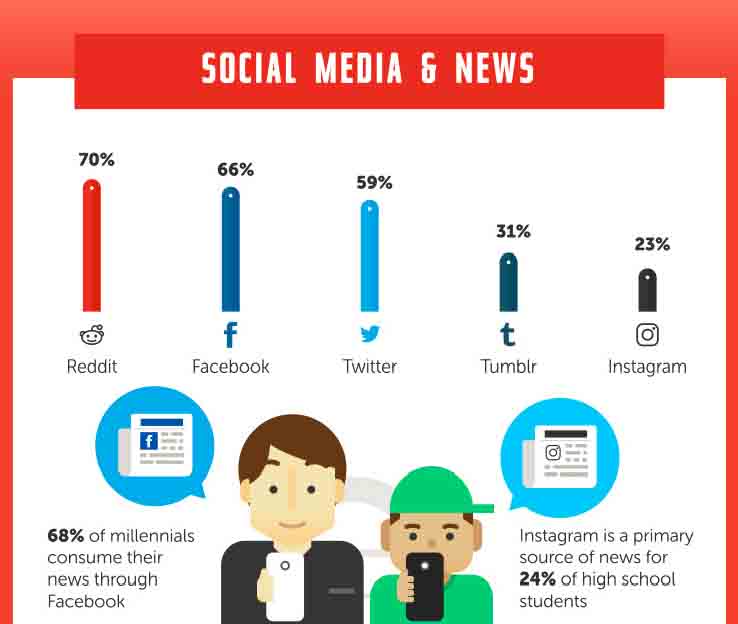
si-6Does your analytics solution measure traffic coming from all different platforms–even the ones your company doesn’t subscribe to? A large mysterious uptick in traffic can often be credited to a share on Reddit, a community-oriented social news aggregation site and forum. Your company doesn’t have to have an account here, or on any social media site for that matter, to be attracting traffic.

si-7

Every platform has its perks when it comes to purchasing decisions. Sale and purchase alerts are best influenced by Facebook; Pinterest excels at providing additional product information; and Twitter is the place to go for product recommendations, discoveries and purchase reminders.

si-8

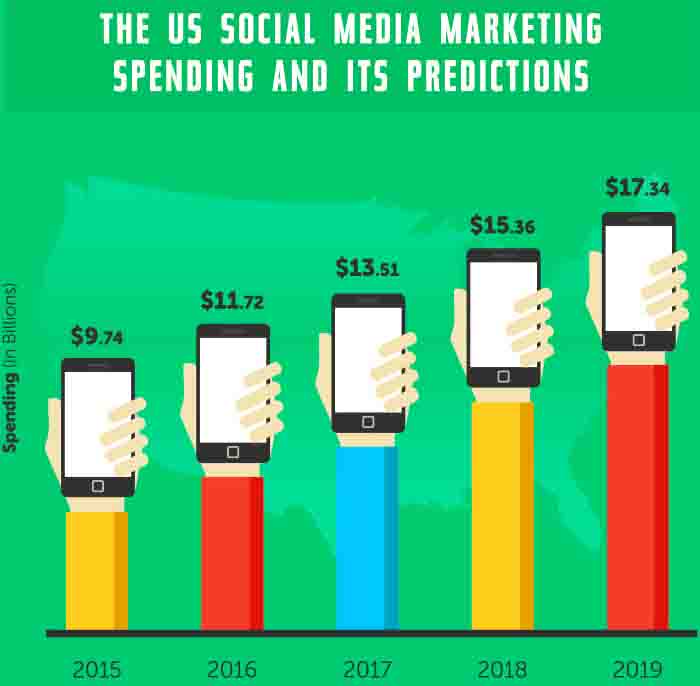
Is your social media spending budget increasing each year? If so, you’re alone! If the increase remains steady over the next few years, we’re looking at more than $17 billion on social media marketing in 2019.

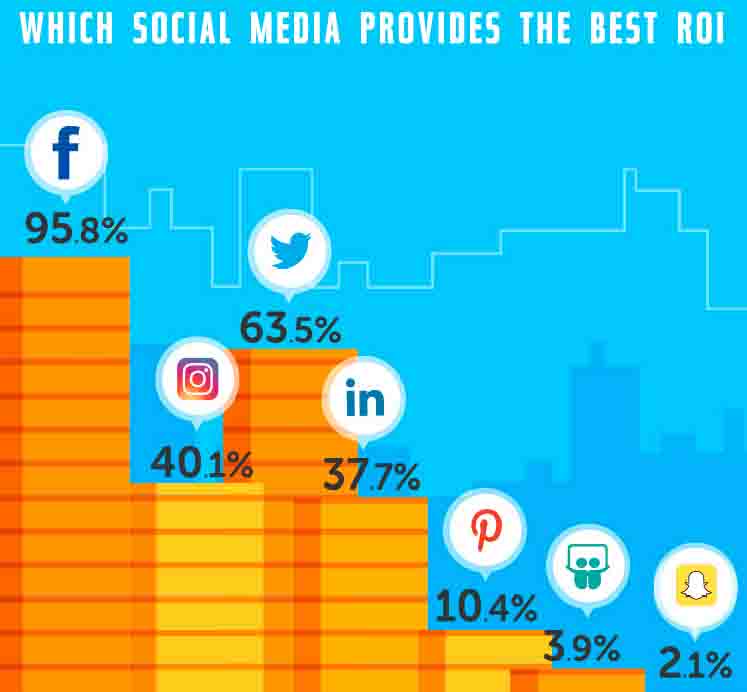
si-9Perhaps the most valuable data in the infographic, this illustrates that Facebook is untouchable when it comes to ROI. This doesn’t mean platforms like Slideshare and Snapchat (the sixth and seventh figures on the chart, consecutively) don’t have their place in a social media strategy. In fact we’ve founder the latter to be a great opportunity for event promotion. 

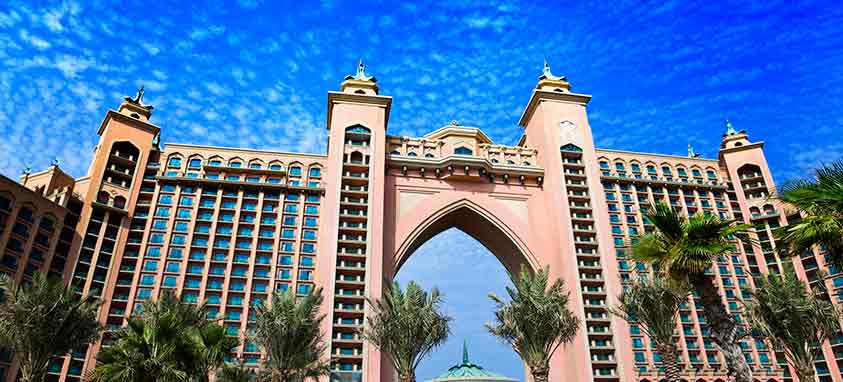
atlantis-dubai-most-instagrammed-luxury-hotels

Instagram recently shared its list of most Instagrammed luxury hotels with Bloomberg. While there was no criteria for making the list other than the volume of tagged posts, every property on the list holds five-star accreditation.

1. The Cosmopolitan of Las Vegas — The old adage “What happens in Vegas stays in Vegas” went out when Instagram hit the scene. Now every guest room, meal, pool party and escapade is well documented for the world to see, share and like. It’s fitting, then, that the top Vegas property on the list is the one that markets itself to the younger party crowd. With clubs such as the Marquee Day/Night Club, and Rose.Rabbit.Lie and countless dining options, there are oh-so-many photo ops at every turn.

#Vegas sunsets are our favorite color. Photo Credit: @phreelance

A photo posted by The Cosmopolitan of Las Vegas (@cosmopolitan_lv) on

2. Atlantis, The Palm, Dubai — One look at this property and you’ll understand why everyone must snap a photo. Underwater suits, 21 dining options and a waterpark you have to see to believe are just some of the amenities that make this breathtaking resort so popular. Plus the hotel’s landing page features a scrolling archive of Instragram posts, in case you didn’t know what you’re missing.

3. Fontainebleau Miami Beach – Big-name performers, epic clubs and famed restaurants such as Hakkasan and Michael Mina 74 – maybe that’s why it’s been named the No. 1 Hotel in Miami Beach by Travel + Leisure. Beachside cocktails, wild nightlife and historic architecture are among the themes of photos posted.

4. Wynn Las Vegas – The Wynn can thank its flower displays for its ranking within the top Instagram posts, although there is much to check out at this award-winning property. Nightly entertainment, awe-inspiring beach clubs, and unbeatable food options (collectively, Wynn Las Vegas and Encore hold more Forbes Travel Guide award-winning restaurants than any other resort in North America).

Flowers, Vegas style. #wynn

A photo posted by Nikki Ekstein (@nikkiekstein) on

5. Ushuaïa Ibiza Beach Hotel – Located in Islas Baleares, Spain, this hotel boasts beautiful, uber-modern guests rooms and function spaces—but that’s not what’s getting all the attention on social media. As you can gather the moment you enter the hotel’s website, its biggest draw is its entertainment. Only open in the summer, it’s Instagram following is nothing short of impressive.

social media news

1. Twitter Adds Explore

The Scoop

Twitter’s “Moments” tab has been replaced with an “Explore” tab in the app. The section still remains, just under the Explore tab now. Explore contains trending topics, Moments, search and live videos. It was implemented to make searches for popular topics, news stories and trends easier.

The Explore tab was introduced to its Twitter users last week. Currently, the Explore tab is available to iOS users and soon will be available on Androids.

Meeting Planner Takeaway

Twitter, like many other social media platforms, wants to emphasize the importance of live videos with the Explore tab. After all, these appear on top of other content in the Explore tab. Twitter also recognizes that people want quick presentations of easily digestible news through a single resource, emphasizing the popularity of concise and digestible content.

2. MailChimp Incorporates New Facebook Feature

The Scoop

MailChimp’s 15 million users will now be able to buy and manage Facebook ads through its platform. Thanks to the collaborative project, companies can more easily and effectively showcase products, drive traffic to pages and/or encourage enlistment on MailChimp.

A larger audience will be established as Facebook users and mailing lists are combined. Overall, MailChimp hopes to integrate more advertising systems and improve marketing tools.

Meeting Planner Takeaway

The first lesson that can be learned from this development is that Facebook ads are extremely effective at engaging users. MailChimp will not be charging users extra for Facebook integration because they are so confident in its contribution to their brand. The other important takeaway is that MailChimp is a promising program to invest in if you are looking for a way to streamline your online advertising and marketing tools—especially if you’re a small business.

3. Facebook Begins Using Stories

The Scoop

Facebook is getting aboard the momentary-content trend. Much like Instagram, Facebook is adopting a Snapchat-style feature. Considering how successful Instagram Stories have been, 150 million daily users within the first five months, Facebook’s similar development doesn’t come as too much of a surprise.

Facebook Stories is currently available in Ireland, but it’s safe to expect an expansion soon.

What it Means for Planners

Snapchat is extremely popular. In fact, Eventbrite reports that Snapchat has 200 million active monthly users, which is double the number that LinkedIn has. Big media brands are taking note of the urgency and intrigue evoked by Snapchat’s temporal design and opportunity for exclusivity. Interestingly enough, these elements are exactly what attract people to events.

With several platforms now providing this service, you don’t have to choose just one.

4. Gen X Surpasses Millennials in Social Media Use

The Scoop

A report by Nielsen released this month reveals that Americans within the ages of 18 to 34 years old spend less time on social media than those 35 to 49 years old.

On average, the older demographic used six hours and 58 minutes on social media per week. Meanwhile, the younger sample spent less, only six hours and 19 minutes on average. Adults who were 50 and older spent an average of four hours and nine minutes on their social media pages per week.

This report is based on data, not self-reports, collected from 9,000 smartphones and 1,300 tablet users throughout the United States, spanning from July until September 2016.

What it Means for Planners

These results are both surprising and crucial for any business. Social media strategies rely heavily on the target demographic. Understanding your audience is the biggest component of successfully catering to them.

event social media

Daily and event social media strategies are two different breeds. Accordingly, they should be treated as separate processes to maximize the success of both. Here are some fundamental but crucial guidelines for optimizing an event’s social media strategy.  

Do: Know Your Audience

Understanding your audience will always be the best way to reach them. Be selective about choosing social media channels that target the proper audience and consider groups and hangouts that truly focus on a niche. Also, acknowledge your audience when crafting posts. Consider which tone of voice, hashtags and types of images are most appropriate.

Don’t: Get too Sales-y

Using social media to glamorize an event and capitalize on ticket sales can actually hinder your ability to reach that goal. Ensure that the link to register or purchase tickets is accessible, but don’t overpromote. Convey the highlights of the event in an engaging way that appeals to the public on a deeper level.

Do: Strategize Beforehand

Scrambling to conjure up a social media strategy at the last minute, while facing pressing event challenges, is nearly impossible. It’s also not very effective. Designate an event social media manager who will spearhead the campaign, then plan a strategy that starts at least a month prior to the event. This will ensure the highest engagement and largest reach.

Don’t: Agonize Over Hashtags 

Keep the event hashtag simple, easy to remember and directly related to the event. The hashtag should be distinct and relevant to your brand. It doesn’t require layers of complexity and wit—just make sure it gets the job done and aim for brevity.

Do: Take Advantage of Advertising

Getting the word out about an event will cost some money. In a world where these social media platforms are available to everyone, there’s a price to pay to have a competitive edge. Often, the reality is that social efforts won’t be seen without a paid marketing campaign. Expect to put real money into this, as it’s a good investment. Including essential event information, registration links and distinct hashtags will ensure good ROI.

Don’t: #Overdo #the #Hashtag

Reach is very important, but when hashtags are sprinkled between every other word, interest is lost and posts look like spam. Be selective with hashtags. Remember that click rate isn’t the only important factor—content matters too. It’s fine to use the event hashtag more often, then occasionally sneak in a predetermined list of industry-related hashtags.

Do: Enjoy Yourself

Social media is entertaining, enjoyable and social by nature. When posts come from a place of genuine enthusiasm, this shows through. Sometimes posts will take you out of your comfort zone, but that’s all part of the fun. Allow yourself be bold and open when it’s called for.

Don’t: Forget to Live-Stream

This can be very difficult, as there are a million different things to focus on during an event. Live coverage can easily take a backseat. Live-streaming has been growing in popularity as a great tool for building a brand voice and stirring up excitement about an event. Don’t forget to take a few minutes to get that coverage, because the growth in engagement may be surprising and will boost your brand’s relevance.

Do: Follow Up with Content & Analytics

Showcasing the event after-the-fact will be valuable to the endeavor’s overall success. Create attention-grabbing content. Make use of photos taken at the event and pair them with detailed content. If the event looks attractive, people will already be looking forward to the next one.

Analytics also need to be examined. Fundamental metrics, such as new followers, retweets, influence and engagement are revealing. Check for ROI and KPI factors across the board. Additionally, look at the actual feedback—this information is extremely valuable in building the next venture!

Don’t: Keep Harping on it!

It’s important to push event content, but after a few days it’s time to let go. Once the event has ended, your audience is going to move on after a short amount of time. Remember to mix recaps with other fresh content to keep your pages alive. To avoid repetition, it’s also effective to alternate your materials with other brand articles regarding the event. Don’t forget that your brand is on social media to add value to a community through educating and entertaining, not to self-promote.

attracting millennials

Millennials have outnumbered baby boomers since 2015, creating significant buzz around targeting the younger demographic. Regardless of the industry, attracting millennials is a hot topic of modern marketing. And the focus is entirely warranted, considering millennials make up about 25 percent of the world’s population, according to the U.S. Census Bureau’s International Database.

Millennials are known to be social media-obsessed, but social media marketing strategies need to be more sophisticated when catering to this  very large and diverse group of people. This is especially important for occupations that interact with a variety of markets, such as meeting and event planners.

So before diving into the fast-changing world of social media marketing, what should planners know about interacting with them?

Different social media platforms serve different functions

Different social media platforms should be considered separate entities. Each varies in function, tone and audiences. For example, an American Press Institute survey found that 58 percent of millennials cite using Facebook to find things that entertain them, such as funny lists, articles, or videos, while 43 percent use Twitter to see what’s “trending” and what people are talking about. LinkedIn, on the other hand, is reserved for career and networking opportunities.

…And have distinct usage styles

Use and post frequency also vary by platform. A new survey from SCG, an advertising and public relations agency, addressed 333 U.S. high school and college students. In the study, 78 percent of respondents reported using Snapchat on a daily basis, which is slightly more than the 76 percent who reported daily Instagram use. Meanwhile, Facebook usage was even lower, at 66 percent. Therefore, your social media plan should follow the conventions of particular platforms. Post frequency is part of its etiquette and definitely has the potential to enhance or harm your reach. Over-representation can be harmful to your brand’s image.

Subgroups must be considered

Although it is often overlooked, considering demographic subcategories is crucial component in targeting millennials. Factors such as age, gender, location, education and ethnicity all interact in creating important subgroups. For instance, male millennials aged 20 to 25 years old in Ohio generally have different behaviors and patterns than female millennials 30-35 years-old in Los Angeles. Both are millennials, and that information matters, but other factors also hold weight as well.

A survey of more than 1,000 people showed that Instagram and Snapchat usage varied greatly by age even though both groups were in the millennial range. Survey respondents 20 to 25 were very likely to have these accounts on mobile apps, whereas those 26-35 were far less likely. (Ipsos – just for my reference when I link this later)

Millennials may have many shared tendencies, but within the group a lot of differences emerge depending on other, distinguishable factors. Understanding group patterns makes for an effective approach.

It’s easy to get caught up in the details of an event and neglect certain tasks. One aspect of planning that requires a prominent place on your to-do list is social media marketing. But strategic use of online platforms does not have to be a full-time job. From hashtags to Snapchat, here are some tips for tagging all the bases at your next brilliant production.

1. Choose Content Wisely

It’s important to cross-pollinate across all social media platforms, but the content may vary slightly for each outlet. For example, Snapchat is all about the stories that disappear in 24 hours, whereas Facebook is ideal for promoting to a network and LinkedIn simplifies professional networking. By promoting events using the appropriate tactics for each outlet, you can reach your entire audience. For instance, you’ll probably post links to professional articles with proper punctuation and grammar on LinkedIn, while Instagram is perfect for fun photos, witty captions and a more casual tone.

2. Define and Spread Your Hashtag

In a world where it is easy to be overwhelmed, hashtags are more crucial than ever. These keywords and phrases allow attendees to connect with your brand, event and each other. Make sure the hashtag is everywhere, from the event description to the biography on your Instagram, and encourage attendees to post it as well. And don’t wait until the day of the event to begin using it—build-up to the event should include your hashtag as well. For a little more encouragement, set up a photo booth or promote a giveaway for the best photo that uses the hashtag.

3. Invest in Facebook Ads

Did you know that the majority of the people who have “liked” your page on Facebook won’t see your posts? Due to Facebook’s algorithms and the vast amount of posting your attendees are seeing on their homepages, it’s easy to get buried underneath other status updates. Make room in your budget to pay for ads for your event as it increases your chances of spreading information around. You can also choose target demographics based on age, location and gender. It’s a fantastic feature for finding potential attendees that have yet to discover your brand.

4. Take Attendees Behind the Scenes

People love to be in the know—who doesn’t like getting insider information? Give your followers a glimpse into the preparation that happens before a big event. Post a Snapchat story that will disappear in 24 hours for the ultimate sense of secrecy, or post a short video to your Facebook page as a teaser of what’s to come.

5. Re-post from Previous Events

If this isn’t your first rodeo, post content that was recorded at the previous event. This will encourage potential attendees to come and partake in the festivities instead of experiencing the fear of missing out (FOMO). The more surprising and visual the post, the more likely it is to draw people in. If you have plenty of video clips, create a short highlight reel and post it to YouTube, where you can feature it as your channel’s welcoming video.

6. Showcase Speakers

Choosing a keynote speaker takes time and effort, and people have high expectations. They want to gain insight without feeling as though they’re being lectured. Give attendees a taste of your speaker’s style by pulling quotes from previous keynotes or sharing what makes them special through an image. People respond more to photos and videos, so think of overlaying a quote for maximum impact.

7. Don’t Abandon Email

Unless your demographic is solely catering to millennials, some attendees may not use the latest social media. However, almost every attendee will have access to the Internet and an email address. Newsletters still carry a lot of value—including making sure no one feels left out because they’re not using QQ Chat or WhatsApp.

Instagram is big and getting bigger, and marketers are making a strong presence on this social platform a pillar of brand strategy. The numbers speak for themselves. According to Eventbrite’s 2018 Guide to Instagram for Event Marketing, there are 25 million active businesses on Instagram, and more than 200 million users check brand profiles every day. A third of the most-viewed Instagram stories come from brands, and 30 percent of Instagram users have purchased from a brand they first discovered on the platform.

Instagram is extremely valuable for event promotion—a great tool for marketing your meeting in the months leading up to it, during the meeting itself and following its successful execution. Here are some tips on how use Instagram to take your event to the next level.

Make Your Page Pop

When promoting an event, you need a captivating Instagram page to draw in potential attendees. You want to show what makes your event unique, what you’ll bring to the table and why people should want to come.

In the few months leading up to the event, include your audience in the planning process. Share a video snippet of your team hard at work, or a photo of the event space. People enjoy feeling as though they’re seeing something others aren’t; by giving little glimpses into the preparation phase, you’re piquing potential attendees’ interest.

Invite Your Audience to Interact

Another way of drawing people in is to make them work for rewards. Instead of simply announcing who your keynote speakers will be, make your followers guess by revealing weekly hints about who they could be. The grand reveal will be all the more exciting.

If this isn’t your first time hosting the event, post photos and videos from the past to showcase what attendees can expect. Use a hashtag (we can’t say it enough!) early on, so potential attendees can find #ThrowbackThursday memories from past attendees on one page. You can also search the hashtag to re-gram photos previously posted.

Game Day Guide

The day is here, and you finally get to see your ideas and hard work come to fruition. But the day can also be overwhelming, and it’s easy to let social media fall by the wayside. But from start to finish, Instagramming is a must. Having a strategy for what posts you are going to put up—and when—with captions already drafted will take the pressure off.

The morning of, start by posting a welcome message and any necessary agenda items. People will check in for last-minute information you post, so answer any pressing questions in your caption. This will not only help attendees feel properly prepared—you’ll also be saving yourself from repeatedly answering the same thing.

Don’t forget about Instagram stories. These pictures and videos disappear after 24 hours, creating a sense of urgency to check your page regularly to avoid missing anything. Nobody wants to feel left out.

Throughout the day, people will inevitably take breaks to scroll through social media and post what they’re doing. Use the hashtag you set up in the months leading up to the event and encourage attendees to do the same. You can even run a contest for the best Instagram post using your hashtag. Bingo! People will be more likely to share their experiences.

Post a video of yourself doing a pre-event interview with a keynote speaker or chef preparing Insta-worthy dishes. This taps into everyone’s love of feeling in the know.

If all this sounds slightly overwhelming, consider making room in the budget for somebody who can handle your social media for you.

Post-Event Feedback

As fun as it may have been, it’s a relief to be done with an event. But that doesn’t mean your presence on social media is over.

People use social media to express what they thought of your event—positive or negative. A few days following the event, make sure to post a thank-you note to attendees. In this same post, ask what could be executed better next time. Set up a survey, and when those suggestions come in, acknowledge them. It’s easy for people to feel as though they’re just another comment; show you care about their opinions by responding personally.

For a month or two following, update regularly with photos and videos from the event. You don’t want to fall victim to “out of sight, out of mind,” especially if it’s an annual affair. Continue to engage with your followers, and it will pay off in the long run.

social media improve 2019 events

Will 2019 be the year you leverage social media to make your events safer, more compelling and downright fun? A new survey shows that planners are missing opportunities to connect, sell sponsorships and build community.

A January 2018  report from WeAreSocial and Hootsuite explains just how important social media is in the average internet consumer’s life. More than four billion people are online and more than three billion people are active on several social media platforms.

Smart Meetings contacted Michael Burns, executive vice president of global sales and marketing at Aventri, for tips on how to leverage all that traffic for events. He shared that most event professionals use social media for marketing, but are not completely utilizing the advantages of each platform, such as page traffic, comments and clicks to the event website. Ignoring these metrics can lead to missed opportunities for the event and the company.

Aventri and Little Bird Told Media surveyed 185 event professionals on how they use social media to improve their events. They released the results in November in a report called Social Media Trends for Events: Phase 1, which showed 88 percent of the respondents said they use social media during their events—a sign that social media is not leaving the events industry anytime soon.

Here are the internet and social media trends planners need to know for 2019.

Risk Management

Risk ManagementMore often, companies are dealing with tragedies ranging from public relations scandals to natural disasters. Burns stresses that event planners can no longer avoid social media if they want to be prepared for a crisis.

More7 Tips for a Successful Crisis Management Meeting

“Most attendees walk around events with immediate access to social media. What better way to reach them if a crisis arises? Social channels are also a great way to share vital information and updates quickly with the greater community beyond your event,” Burns says.

Burns urges event planners to be proactive and transparent because all comments made on social media can be used as an official statement. If a company is open and honest during a crisis, attendees and followers will be more likely to continue trusting the company rather than immediately distancing themselves from the brand.

Post-crisis is also an important time to be active online. “During a crisis or a period of negative press, many organizations go dark. That’s a mistake,” Burns says. “Best practices call for getting ahead of the story and engaging directly with your community.”

Mobile Friendly
Nothing is more annoying than when you try to access content on your smartphone and it does not run properly, fit on the screen or does not load at all.

According to WeAreSocial, 3.722 billion internet users access the web through a mobile device, that is 49 percent of the human population. With most internet users consuming social media through their mobile devices, it is important their content is operational on a mobile format. If not, planners could be losing opportunities for potential attendees and sponsors.

The Facebook Effect   

The report from WeAreSocial and Hootsuite shows that in January 2018, Facebook dominated the list of top social media platforms with 2.17 billion active users. YouTube followed with 1.5 billion users, showing the rise of video and audio formats. The Aventri and Little Bird Told Media report found that 90 percent of participants use Facebook. Twitter was the second most used app at 71 percent. That makes both platforms effective ways to reach potential participants, even post-data breach.

Facebook recently streamlined event advertising with the reintroduction of search ads. Experts recommend linking Twitter and Instagram to Facebook to expand reach efforts. Creating an event on Facebook keeps attendees engaged leading up to the event by showing who is going and giving them a chance to connect with others before, during and after the event.

#Hashtagging
Strong hashtags are more important than ever. The Social Media Trends for Events report revealed that 4 out of 5 event professionals are using a specific hashtag during their events and almost half are using secondary hashtags to promote other facets of the event.

“There’s no rule that says you can only use one hashtag for your event,” Burns says. “Many event profs are realizing secondary hashtags can be as effective as your primary one when you promote them to attendees.” According to Aventri and Little Bird Told Media, tracking multiple hashtags allows you to see who is using and following the hashtag while you decide if those attendees could be potential influencers or sponsors. Only 43 percent of event professionals are tracking hashtags during their events. That means the other 57 percent are missing out on vital connections.

MoreMissed Connections: You Just Missed Your Most Important Contact

Video Domination

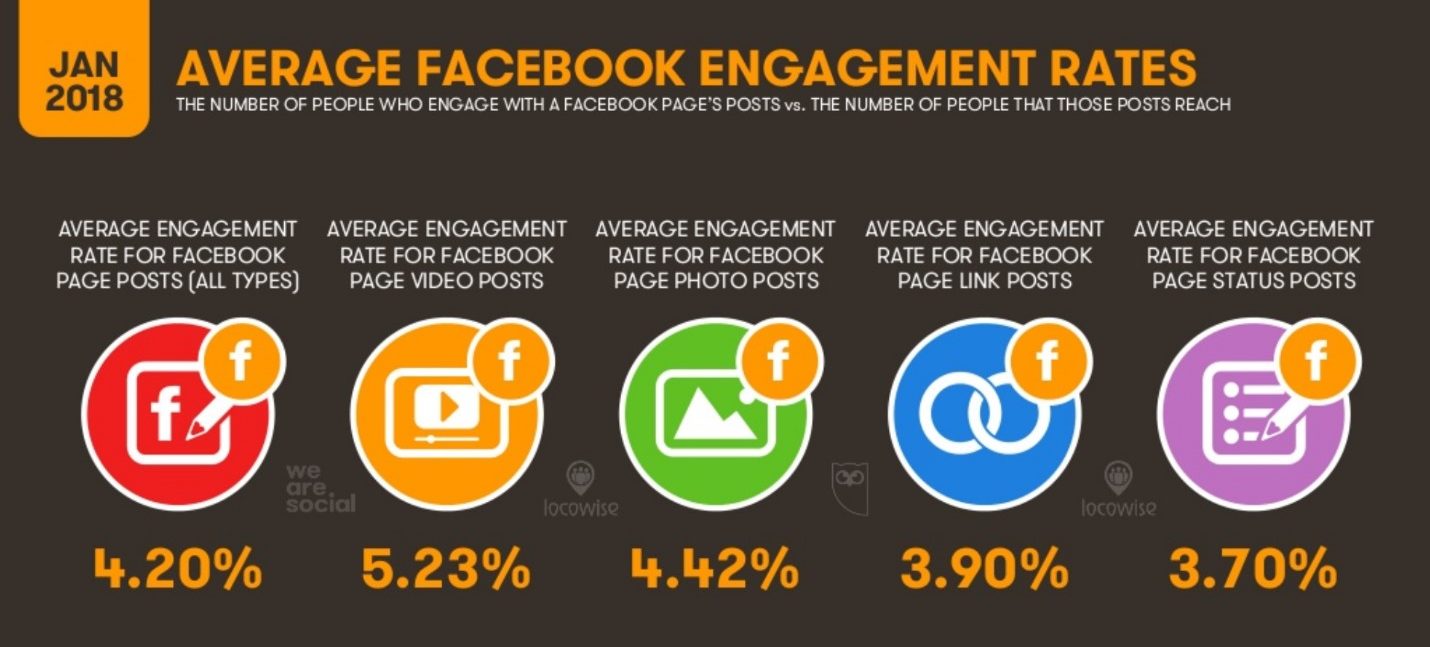
Worldwide, new people are introduced to the internet every day, increasing chances for global connections. Language, literacy and small attention spans are huge barriers to overcome when it comes to global communication, pushing many internet users into video and audio formats. Social media consulting company Locowise reports the average engagement rate for video posts on Facebook is at 5.23 percent while Hootsuite shows photo posts at 4.42 percent and page status posts at 3.7 percent. Those are big differences when applied across all content streams.

Slide 72 from the Digital in 2018 report breaks down how much engagement each post format receives.
Live video formats, such as Facebook Live and Instagram Live, show non-attendees what they are missing. Aventri and Little Bird Told Media report that 81 percent of event professionals are using Facebook and Instagram to live stream their events.

The bottom line from both reports underscores the importance of optimizing social media metrics to be at the forefront of event planner’s priorities.
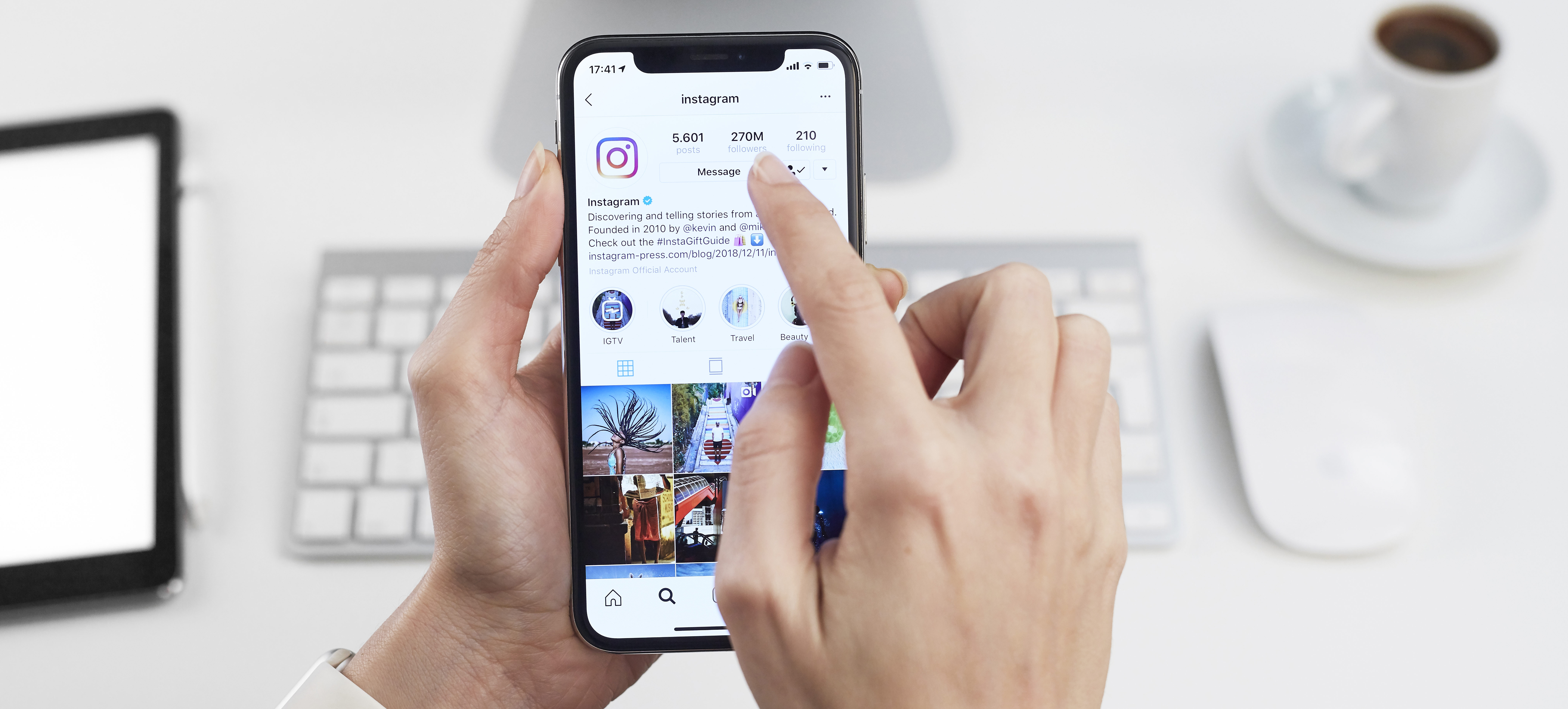
Did you know that since the photo sharing social media platform Instagram launched in 2010, it now has 1 billion active users every month with more than 500 million of them using the app every day? Though videos have long been a part of the platform, last year, Instagram released its newest IGTV feature that lets users post videos of up to 60 minutes.

You can now schedule the sharing of high-quality videos on your channel, thereby connecting with a new mobile audience. IGTV is different from the existing story or post option. Visitors can access this feature in-app or download a stand-alone IGTV app. This introduction is timely since, according to a new study by Cisco, by 2019, 80 percent of web traffic will consist of videos.

As an event planner, the new feature could help you market your business and promote your events. Here are a few tactics to help you create engaging video content for your Instagram TV channel.

Tips for Buzz-worthy Videos

While you might be used to flipping your phone horizontally to view videos, all content on Instagram’s TV feature is tailor-made for mobile users and can only be played vertically. The size ratio for a video on your channel is 9:16, so make sure you edit your videos to fit this ratio if you haven’t shot it from your phone.

To get your audience to click on your channel, you must have a compelling cover image. Also note that these videos play automatically, so avoid starting your video with a loud noise or music. The user may swipe left to the next video.

Once you have shared a preview of your IGTV video on your post, the video will automatically pause after one minute and viewers will be prompted with a Keep Watching button to continue watching in IGTV.

If you have any older videos posted on YouTube or in your archives, it is time to repurpose evergreen content to meet your new mobile audience. If they are horizontal videos, you may need to edit to fit IGTV’s ratio with the help of third-party applications.

To optimize your channel for discovery, write a short, gripping title between 15-20 characters, add descriptions with keywords and use as many hashtags as you can, just like you would in an Instagram post.

Do not confine your channel to old videos. To build a dedicated audience, create some structure. Just as a television show would recur on a particular day and time for viewers to tune in, it is best you produce content on a fixed schedule. If creating a weekly video is time-consuming, try monthly.

This feature automatically broadcasts your videos to existing followers, so you don’t have to build an audience from scratch. Eighty-eight percent of Instagram’s users are outside the U.S.; if your business or event seeks to target the global population, then broadcasting your event on IGTV could help with that goal.

The same way you post across all social media platforms, don’t forget to cross promote your IGTV video. Before you publish your video, you will be prompted to post on Facebook as well. IGTV also allows you to include links in your video description. Add your website link to direct users to your business.

How to Create Your IGTV Channel

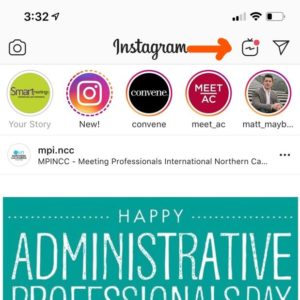
  1. Tap on the TV logo on the top-right corner of your home screen
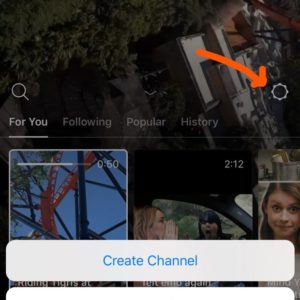
  2. Tap on the settings icon on the right and select Create Channel.
  3. Follow the screen prompts and select Create Channel.
  4. Tap on your profile and select Upload Video.
  5. Select a video from your gallery, then add a cover image and tap Next.
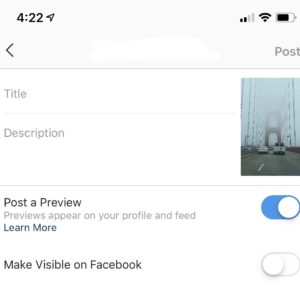
  6. Add a Title and Description, then select Post a Preview and Make Visible on Facebook. Note that you cannot select Post a Preview later, so this is your only chance to select it.
  7. Tap on Post
advertisement

Content Secrets of the Savvy Planner

IGTV is an opportunity for event professionals to creatively engage with attendees—and potential future attendees. Here are a few examples to get you started:

  • Behind the scenes
  • Attendee Testimonials
  • Product tutorial
  • Keynote speaker’s talk
  • Q&A with industry experts
  • Podcasts