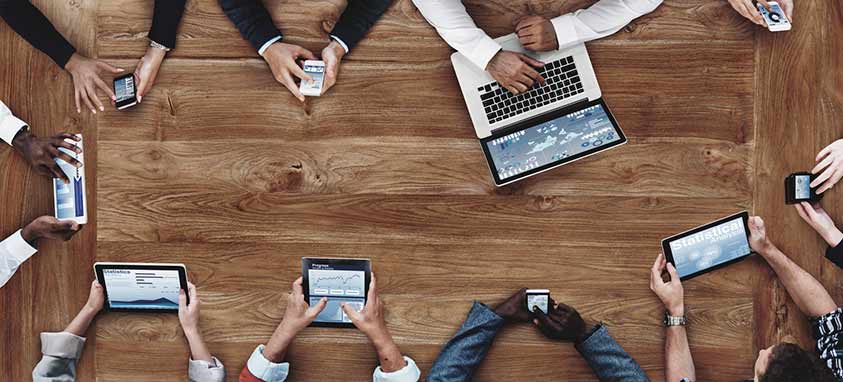
Fact: Anyone attending a business or trade conference is going to expect to have instant, reliable Wi-Fi. Fact: Providing flawless Wi-Fi to hundreds of users is actually quite difficult. Fear not, we at Smart Meetings have hacked the code to providing Wi-Fi to the masses. Here are our seven Wi-Fi commandments to live by.

Thou Shalt Meet the Demands

Plan to supply a Wi-Fi network that can support all of your attendees and all their device—that includes laptops, smartphones and tablets. Chances are that your attendees will have all three! So once you’ve got your final head count, triple that and you’ll know how many devices you need to support on your network. It’s better to oversupply than under. This might mean that you have to bring in your own system aside from what the hotel can provide to ensure seamless use.

Thou Shalt Make Sure the Main Areas are Wi-Fi Friendly

It’s the nightmare scenario: You get perfect reception in the hallways, but once inside the conference rooms, the Wi-Fi signal immediately shuts off. If you’re using a hotel or convention center’s network, make sure to test each room as you do a walk-through. Not every corner of the venue is going to have perfect connection, but you want to make sure you have it where it counts.

Thou Shalt Understand the Technology

There are two types of Wi-Fi frequency nowadays: 2.4 GHz and 5 GHz. The former is the traditional frequency, but it doesn’t have a very far reach and is susceptible to interference. The latter is much faster and can penetrate walls with ease. But if you’re bringing in your own system, bring in the big guns and use a dual band system, which will offer Wi-Fi at both speeds so that there’s no crowding of one network, which will help with speed as well.

Thou Shalt Control the Traffic

You don’t want one attendee live-streaming a video that slows down the entire network. So restrict the amount of data available—it’s common practice in the meetings world. However, you and your team should have unrestricted access to the Wi-Fi—it’s one of the perks of the job.

Thou Shalt Embrace Speed

You could have everything else set perfectly in place—frequency, range, availability—but if you don’t have speed, then it was all for naught. And we’re not just talking fast internet, we’re talking super-fast, lighting-speed internet: 10Mb per 100 users would be golden for even the highest usage events. If you know it will be lower, go ahead and dial it back to 2Mb per 100 users. There are plenty of websites that can test speed, but speedtest.net is a good one. It’s a good idea to test your speed a few times throughout each day of your event to address issues before they become the talk of the conference (because they will become the talk of the conference if they go unresolved).

 Thou Shalt Use a Password

For both security and stability, your Wi-Fi network should have a password. This will prevent non-attendees from latching onto a free network and burning through your data, as well as potential hackers from just waltzing right into your private network. How you choose to share the network password is up to you—just remember that plastering it across the conference room walls makes it easy to access for both your attendees and potential threats.

Thou Shalt Treat Wi-Fi like Water

The internet is a utility that our society is so used to having access to that we actually take it for granted. And that’s exactly what you should expect from your attendees. It is integral to business, so it needs to be dependable. Think of Wi-Fi like water: Without it, people get cranky, aren’t able to work and will complain until they finally get what they need. No, they won’t die without it, but your event will.


bidirectional Real-Time CRM

If you don’t know what bi-directional real-time CRM solutions are, you soon will.

As a meeting planner, it might even change how you run your operation—by not only offering one program that can organize and track clients and events, but by also integrating automated real-time information exchange and analytics. That’s right. You don’t even have to scan a QR code or break out the iPad.

Here’s the real-world scenario: Have you ever walked a trade-show exhibition floor or into a busy hotel conference lobby, and wished you could exchange contact information and set up a business meeting all without fishing around for business cards or smartphones? Or lamented that the place is so loud, no one can hear what anyone is saying when exchanging contact information.

Enter wearable, Internet-connected technology known as “smartwear.” We’ve seen the GPS-tracking devices that can make sure you don’t lose your keys again or the safety jewelry that monitors where you are and can send emergency alerts with your location. And we’re all well aware of the Apple Watch.

For events and conferences, that technology has usurped name badges and lanyards. Think of it as next-level radio-frequency identification (RFID) tags that don’t require antennas, just Wi-Fi access.

Loopd smart badge

All event attendees have to do is wear the device, and, depending on the software, it will track and monitor them and relay that CRM data in real time so planners can leverage that information when it’s the most useful. Not only that, the wearable allows the attendees the option to exchange information without having to lift a finger.

Heard of gamification? Not actually playing video games, but the ability to poll, survey or otherwise interact with attendees. That’s made possible, too.

If that isn’t enticing enough, imagine automated registration by simply walking through a lobby. Or face-to-face networking while exchanging contact information at the same time. No more running out of business cards, flyers or brochures. Yes, please.

Over at etouches, its March acquisition of smartwear startup Loopd allows the cloud event-management software company to offer end-to-end, full-circle, bi-directional CRM data flow for meeting planners through smart badges.

“After the development of our in-house event performance and ROI solution, Loopd was the logical choice to help continue our journey to offer clients data-driven technology to enhance their events in real-time,” said Shane Edmonds, CTO of etouches. “Once integrated into the etouches platform, Loopd’s technology will provide our clients remarkable insights into their event and business goals, as well as elevate the onsite experiences of their attendees.”

Loopd’s platform, on-site tech, integrated apps and analytics dashboard allows users to exchange content and contact data both passively and actively.

“Data is the future of events, so it is critical as an organization that we are able to provide our customers with the most advanced solutions in the industry to increase the impact of their events,” said Oni Chukwu, CEO of etouches.

And if you’re not already on the Big Data bandwagon, there’s always room.

travel tech

Meeting and event planners are all too familiar with travel. They know each step in the process and have memorized every airport hack out there. Aware of how unpleasant long hours of travel can be, tech companies are working to alleviate the discomfort, inconvenience and general frustration. Perhaps these products will even revolutionize our expectations of the entire experience. In fact, these nifty gadgets are definitely cool enough to splurge on.

1. Mymanu CLIK Earbuds by Mymanu

Language barriers, be gone! These miniscule earpieces have the capacity to automatically translate 37 different languages instantly. Well, almost instantly. The translation process takes an amazing five seconds.

Preorder is available at $199.

2. Wair by Clausette

This scarf is a must for those suffering from allergies or traveling to heavily polluted cities. The apparel has a sensor and built-in filter that catches extremely fine bacteria, pollen and pollution particles.

Preorder is available at $56-$91.

travel tech

Photo by Steamfast 

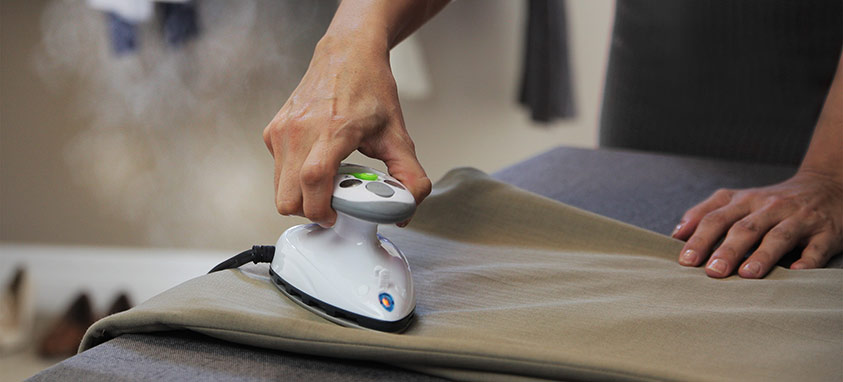
3. SF-717 Travel Steam Iron by Steamfast

Business travelers know it can be a struggle to keep suits and blouses wrinkle-free during travel. This travel iron aims to eliminate that issue. The tiniest iron of its kind, around the size of a computer mouse, SF-717 Travel Steam Iron provides a 420-watt motor and three heating levels.

Purchase is available at $24.99.

4. Polaroid Pop by Polaroid

Much like its predecessors, Polaroid Pop photos print instantly, but with an added option to save them digitally. Polaroid Pop has a 20-megapixel sensor and 3.97-inch LCD touchscreen. It’s the perfect gadget for making Instagrammable—and scrapbookable—memories.

Retail price hasn’t been announced yet.

5. Pocket Keyboard by ZAGG

When business calls or inspiration strikes, a smartphone can transform into a laptop instantly with Pocket Keyboard. Once folded out and attached, it can preserve 86 percent of the typing space of a desktop keyboard.

Purchase is available at $54.99.

6. Luminette by Luminette

Light therapy has long been a practice used to treat seasonal effective disorder, insomnia and jet lag.  Now, it is also portable. Held in a protective case, Luminette’s light therapy glasses can be worn wherever you are. They can have a lasting effect with just 20 minutes of use.

Purchase is available at €239 ($258) and trial at €39 ($42).

7. SmartBackpack by AMPL

Doesn’t it seem like your smartphone battery tends to die when you need it the most? Now you can easily keep all of your devices charged while on the go. This water-resistant backpack can charge numerous devices at once through its USB ports. The paired app will even let the user know what’s charging and when other items need it, reassigning charges accordingly.

Purchase is available by size at $249, $429 and $499.

travel tech

Photo by goTenna 

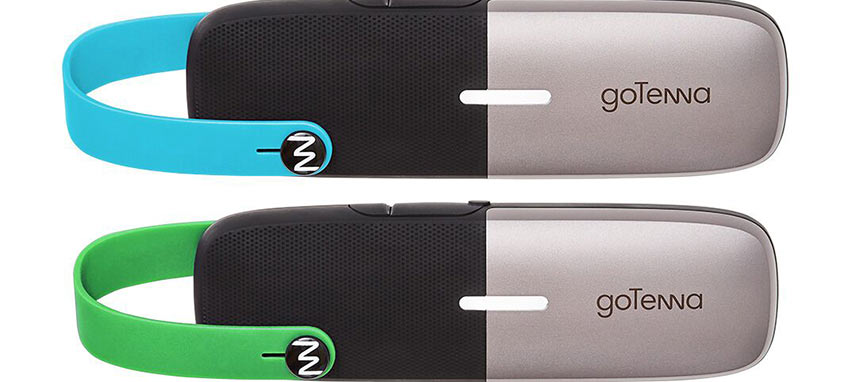
8. goTenna Mesh

GoTenna Mesh allows users to contact others with a range of a few miles. Designed for outings where service is unreliable, such as hiking and sailing, GoTenna is also useful during international trips.

Purchase is available for a pair at $149, or a set of four at $289.

9. GoPro Hero 5 Black by GoPro

Characteristic of GoPro, the device is waterproof and offers a wide range of futuristic features, including voice activation capabilities, a two-inch touch display and a compact, portable design.

Purchase is available at $399.99.

10. Delsey Pluggage by Delsey

A built-in luggage GPS ensures your suitcase will never be lost again. Other Delsey Pluggage features include an internal scale, phone charger, fingerprint ID lock, interior light system and wireless speakers.

Price estimates around $500-$600.

Fears that computers bigger than a smartphone could conceal a bomb in their battery compartments have led to bans on devices bigger than a cell phone in the cabins of flights from a growing list of countries. This is particularly challenging for business travelers on long flights who need to maintain productivity. All is not lost. With a few substitutions, you can still stay connected, safe and working with these simple hacks.

1. QWERTY-Powered: Give your thumbs a break by using a folding Bluetooth keyboard (avoid the larger lithium-ion battery-powered ones to be fully TSA-compliant) that links to your phone. This will allow you to pound out those emails without cramping your fingers. It has all the two-handed convenience of a computer without the bulky size.

2. Picture Light: You may be forced to check your thousands of dollars of video, camera, lenses and tri-pods, but that doesn’t mean you can’t record your travel moments. Compact point-and-shoot cameras can still deliver video and photo clarity worthy of posting while speeding your way through security lines and lifting the burden on your shoulders.

3. Flash Driven: Some airlines are offering loaner computers for the duration of the flight. Bring your documents on a USB and you could be clicking away as you fly through the sky.

4. Pen and Paper: It might be time to take a break from electronics for the duration of the flight. Consider jotting notes in a journal, reading a magazine or diving into that book that has been on your nightstand for the last year. You might find it relaxing.

5. Ship it: Worried about your precious cargo reaching its destination safely and bug-free? Instead of abandoning it to the depths of your suitcase and the possibility of a lost luggage black hole, or possible tampering, consider shipping it. Most airlines charge for luggage now, anyway. A padded, sealed box handled by a logistics company can protect your devices from breakage and break-ins. It can make check-in and the trip to the hotel easier if you know your Mac will be waiting for you in your room when you arrive.

If you do abandon your laptop to your bags, consider doing a backup and deleting or encrypting locally-stored data, setting up a bio (fingerprint) passcode and powering it off completely.

Flying cars aren’t on the consumer market just yet, but the futuristic age of The Jetsons has partially arrived. Remember the videophone on the cartoon? New tools can turn this technology, which once seemed out of this world, into reality.

Have you ever wished you could clone or duplicate your keynote speaker? Or, would you find it helpful to be in multiple places at the same time? Now you can. Holograms make even FaceTiming seem outdated.

May the force be with you if recreate the Star Wars scene in which R2-D2 projects a hologram of Princess Leia who says, “Help me Obi-Wan Kenobi. You’re my only hope.” Executives can teleport to multiple locations simultaneously without ever stepping foot on a plane. Their entire body appears to be standing on the stage or at the podium right in front of your very eyes.

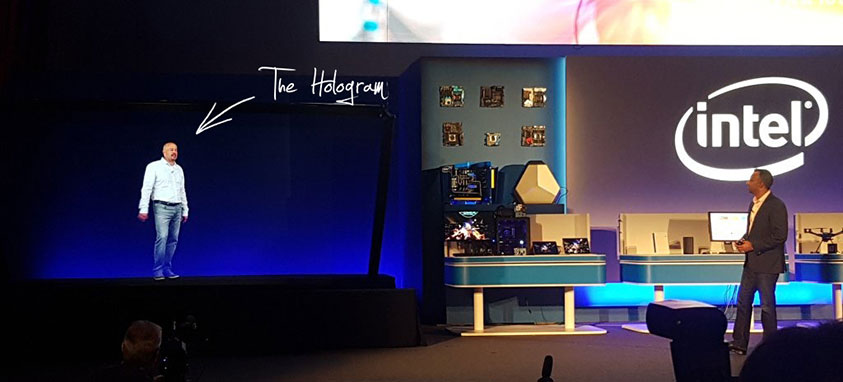
Vntana, a company based in Van Nuys, California, is one of the companies bringing people closer together with this technology. “Vntana telepresence can allow a person to be in multiple locations at once. For example, we allowed an Intel executive to present live on stage via hologram in Taiwan to announce their new processor chip,” Ashley Crowder, the company’s co-founder and CEO told Smart Meetings. “We have done true live from LA to Seoul, South Korea, with less than a second delay so everyone in the audience can ask the hologram questions and they can respond in real time. This is a great way to make a splash for keynote presentations…”

Hologram technology is also being used by the travel and hospitality industries at airports and hotels. NH Hotel Group, which has over 400 hotels in 25 countries, hired Musion, who holds a patent for a 3-D holographic projection system, to incorporate this augmented reality into the hotel’s presentation at The Global Business Travel Association convention in Orlando in 2015. They beamed in their keynote speaker and other figures in addition to giving guests a virtual tour of hotels in the Netherlands.

Activ8-events, which is headquartered in Hong Kong, says their hologram mannequins are used in airports to communicate messages to travelers. A projection of a real person or character can deliver a pre-recorded message. Holograms break down language barriers. Events and airports often have guests from all over the world. A company called Prsonas partnered with Microsoft to create a multi-lingual hologram that has the capability of communicating in multiple languages.

Crowder said that the hologram is also a useful tool for product launches and brand partnerships. “Vntana holograms are a great way to leverage endorsement deals. Brands pay millions of dollars for these deals and are limited by the celebrity’s time, but holograms can be recorded and leveraged across a number of events,” she told Smart Meetings. “For example, Vntana allowed a hologram of Roger Federer to live inside the Mercedes-Benz tent at the U.S. Open the entire two weeks. Fans got to see their hologram live next to Roger, throw him a hologram tennis ball and get pictures and video of the experience to share. Almost 8,000 fans got to do the hologram experience, increasing engagement by 20% from past years.”

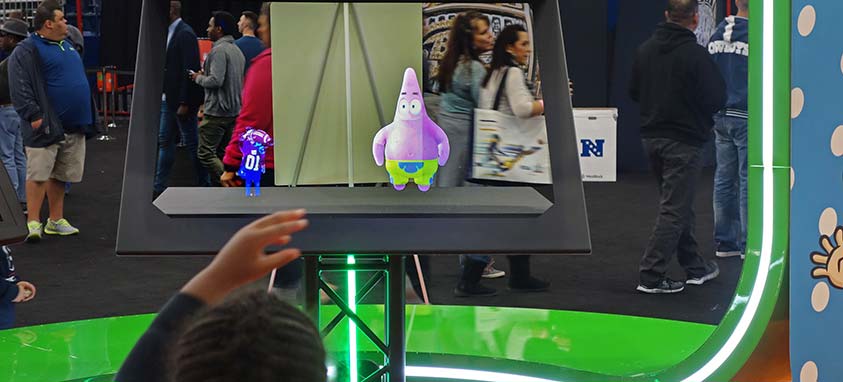
The Hollagram Selfie Booth, Vntana’s most popular product, is particularly appealing to millennials who enjoy interactive uses of AV technology. “Users get to see their hologram live next to hologram products, celebrities, athletes or other hologram objects. They can interact with the holograms via our gesture control and get a video or GIF of their experience to share online,” Crowder explained. “This user-generated content for social media is extremely valuable. It is 50% more trusted, 35% more memorable and 20% more likely to lead to a sale according to Ipsos Millennial Social Influence Study 2014. Some of our clients have seen their qualified leads increase by more than double using the hologram selfie experience.”

Further Reading:

New Audiovisual Tech Boosts Meetings

new google headphones

A set of premium wireless headphones that can support live language translations is among the new products announced by Google on Wednesday.

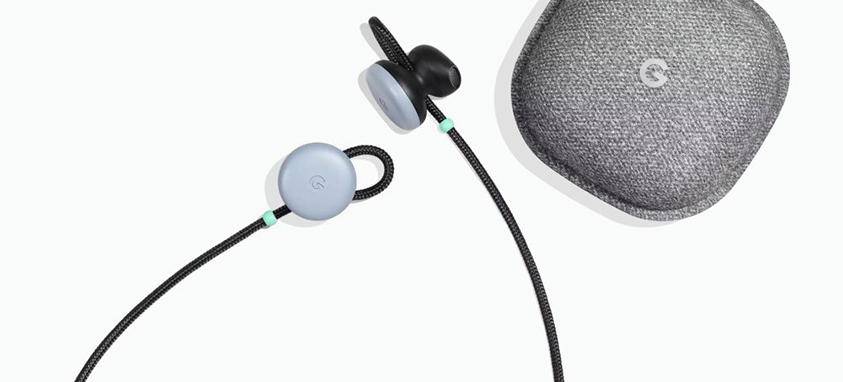
The headphones, called Google Pixel Buds, can tap into Google Assistant—the company’s artificially intelligent, voice activated product—when paired with the new Google Pixel 2 handset. The Google Pixel Buds can give planners a boost, not only by translating between 40 languages, but also by alerting them of notifications, sending texts and giving directions.

If you are waiting to receive a text from a friend or have an upcoming meeting, Google Assistant can alert you to a calendar event or an incoming message, and read it to you if you can’t look at your phone at that moment.

All the audio controls are in a touchpad on the right earbud, so no buttons hang on the cord. Users just need to swipe forward or backward to control volume, and tap to play or pause music. Pixel Buds have a unique fabric loop that makes them comfortable, secure and easy to adjust without having to swap out pieces. They fit into a pocket-sized charging case that provides up to 24 hours of listening time.

They can be paired by opening the charging case near a Pixel or Android phone running Android 7.0 Nougat or higher with the Google Assistant. The phone will automatically detect them and ask if you want to connect.

Google Pixel Buds come in three colors—kinda blue, just black and clearly white—to match your Pixel 2. They can be preordered now and will be available in November for $159 in the United States, Canada, the United Kingdom, Germany, Australia and Singapore.

Among the other new products is the Google Pixel 2 smartphone. It comes with 6-inch and 5.5-inch displays. It will be available in the same colors as the Pixel Buds. The 6-inch Pixel 2 XL features a plastic-OLED curved display that runs nearly to the edges. It closely resembles the LG V30 smartphone on which it is based. The Pixel 2 XL will be available in black or black and white.

gamification

Gamification can enhance participants’ experience of meetings and events, but things can go terribly wrong without engaging content and well-planned strategy. Here is an eight-step guide to improving gamification this year.

1. First, ask yourself, “Why am I using gamification?”

This is an all-important initial step (hence, the length of this description), because if you aren’t clear on your objectives, you and your attendee “players” won’t receive clear benefits. Develop a thorough understanding of what you and your players want. Most of them may be personally focused, and want to expand their social network or education. Or, they may be more group-oriented, and want to boost team building and loyalty. If your group consists of both types, create a game that can help both to achieve their objectives.

2. Realize the potential and limitations of what you can provide, and then begin creating a plan.

Don’t hesitate to be ambitious, but be realistic, as well. Both shooting too low and shooting too high will deprive you and your attendees of maximum benefits.

3. Choose a game that appeals to all—or, to be realistic, nearly all—of your attendees.

Pick a game that is interesting to everyone, and does not require technology and technological skills that some of them may not have.

4. It’s a game, so make it fun.

Don’t lose sight of the fact that players are expecting the game to be highly entertaining and enjoyable. Ideally, it will achieve some serious objectives, but keep it light.

5. Make the game interesting, but simple.

It will be most enjoyable if it piques players’ attention without them having to struggle to learn the rules or grasp what the game is all about.

6. Create engaging elements.

For example, badges, trophies and leader boards can be used to reward players, and storytelling can inspire and entertain them.

7. Use multiple means to measure the game’s success.

Yes, the post-event ROI report and other metrics are vital, but also spend time personally observing participants and chatting with some of them face to face. These, too, are excellent ways of gauging the game’s success, and sometimes reveal important insights that don’t show up in metrics.

8. Learn from your experiences.

Most any gamification effort will have both successes and disappointments. Look closely at both, and the reasons for them. This will help to create more enjoyable, productive gamification for you and your attendees in the future. This way you can improve your efforts, while your guests develop essential skills that can be applied in their personal and professional lives.

drones

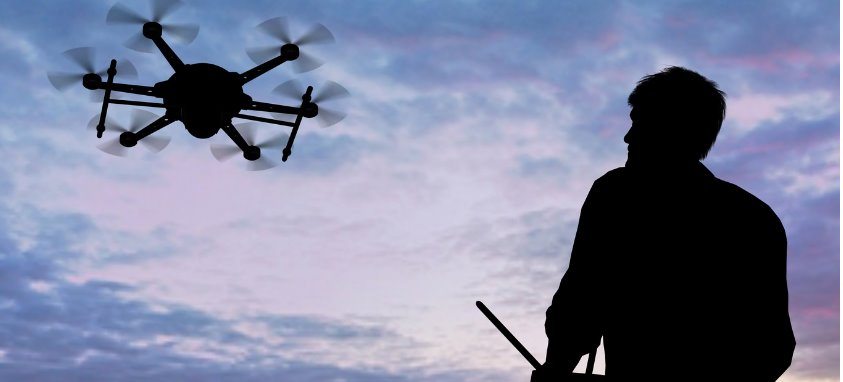
Just because everyone is launching drones in the expo center, doesn’t mean you need to start mapping routes around the chandelier for your next ballroom takeover. Strategic use of remote controlled devices can be a great way to capture the experience from a new angle, stream to remote audiences and keep an eye on things, but taking precaution is recommended.

Create the Ultimate Immersive Experience

Unmanned aerial vehicles (UAVs) have come a long way since they were tested on reconnaissance missions along the Ho Chi Minh Trail during the Vietnam War. Improved endurance and higher clearance has made them popular for lots of non-military purposes, including law enforcement, search and rescue and geographical mapping. Drones have become popular event accessories because they enable live-streaming for remote access. Creating an immersive experience allows for up-to-the-minute updates and is a surefire way to guarantee that you are on the cutting edge of technology.

Add Virtual Reality to Your Drone Technology

DJI Goggles connect wirelessly to the Mavic Pro drone, so that users have aerial views of events without ever having to leave the ground. The goggles allow HD livestreaming over short distances, and the head-tracking mode allows users to control camera movements by simply turning their heads. Incorporating the latest technology in this way will lend your brand originality and is sure to be a talking point long after the show is over.

Smart Tip: Put your company’s name on the drone to maximize the opportunity for brand exposure.

Make Security a Priority

Drones not only assist in documenting your event in real-time and making events memorable, they can also act as a security feature. Drones fitted with cameras offer the possibility of continuous aerial monitoring, allowing for the detection of suspect behavior or security violations. This way, if an incident occurs, security personnel can react efficiently, leaving you to focus on the meeting.

Considerations

With any new venture comes responsibility, and you’ll want the drone to be the talking point of your event for all the right reasons. Since they are considered aircraft, drones are regulated by the FAA, and any violations of these regulations are subject to penalties and/or criminal charges. How can you best equip yourself before sending in the drones?

Pre-flight

  • Be sure that your battery is fully charged
  • Check the propellers for cracks
  • If your drone runs alongside an app such as DJI Go, make sure that there are no firmware updates that need to run
  • Calibrate the drone’s compass, which can be done through the app interface

In-flight

Though indoor drones are covered by fewer regulations, if your event is outdoors, be sure to:

  • Operate the drone at least five miles from airports and at no higher than 400 feet off the ground
  • Only operate during optimal conditions, where winds are low and visibility is high
  • Do not fly over people or roads

Post-flight

  • Turn off the drone before turning off the remote control, ensuring complete control over the aircraft at all times
  • Carefully remove and store the propellers and gimbal to avoid damage

Proper preparation will ensure you are ready to take flight safely and successfully. If you’d like to learn more, why not check out the Commercial Drone Expo, taking place in Las Vegas from October 1 – 3, 2018, or see expouav.com for further details.

cashless options

If yours is an event where there are things to buy, there’s nothing more frustrating—for attendees and you—than a line snaking up to the ATM. The more time they stand in line, the less time they’re spending and enjoying your event.

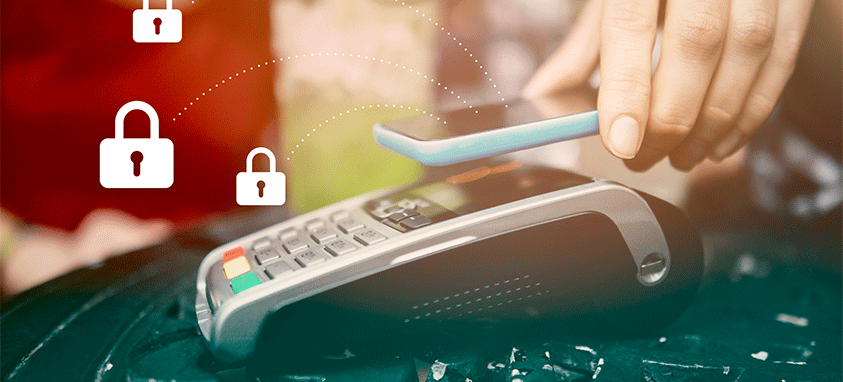
Setting up an event-wide cashless system is easier than you might think. And here’s the best part: Cashless transactions have a profound effect on event sales, which typically increase 15 to 30 percent. You won’t have to worry about safeguarding cash receipts anymore, either.

Intellitix offers cashless payment at events using RFID wristbands. Stations can be placed around the event space, allowing attendees to top up their cashless accounts. The system is integrated with an app that attendees can use to replenish their accounts, as well—or they can opt for automatic refill. Too much in the account? No worries—there’s a post-event refund for any remaining balance.

Glownet offers another option, a system similar to Intellitix’s, with pop-up stations or online software to refill Glownet debit cards or wristbands. The system is network-independent, meaning it can be 100 percent offline without interrupting transactions.

Yet another company in the cashless space is GoCashless, which is focused on cashless point-of-sales. It sells point-of-sale registers with built-in credit card swipes, hand-held terminals for cards and the familiar, square-shaped card reader attached to a smartphone. Some of GoCashless’ products also use Verizon Wireless’ network to stay connected, and tack on a monthly or annual fee. Purchasing GoCashless’ products outright eliminates the per-transaction fee of cashless options such as Square.

If you’re not interested in doing an event-wide system, encourage individual vendors to bring their own cash-free options. This could be a Square card reader attached to their smartphones or a station set up to accept credit cards. Square offers its magstripe readers for free and takes a 2.75 percent service charge per transaction; for $49 you can purchase a Square reader specifically for chip credit cards or tap payments, which includes the magstripe reader for those without chips or card-tap abilities on their cards.

Ready to explore the brave new world of going cashless?

Images are key for event promotion and necessary for attendees to feel engaged, but paying for a professional photographer is not an efficient use of funds. We use our phones as our computers, maps and alarm clocks—and camera quality is improving, as well. Smartphones are now taking pictures that only thousand-dollar cameras used to be able to capture.

If you have always thought yourself to have a keen eye for the lens or want to save money by cutting out a photographer budget, have a look at this list of top-ranking smartphones from DxOMark Image Labs, the industry standard for image quality measurements and ratings.

1. Samsung Galaxy S9 Plus

Introduced last month and bumping the Google Pixel 2 from the No. 1 spot, the latest Samsung product is the phone to get if taking beautiful photos is your priority. Scoring 99 out of 100 on DxOMark’s collective photo and video scores, DxOMark stated it is the “best [photo score] we’ve seen so far.” Producing clear and colorful images at superb resolution, even when zooming, the Galaxy S9 Plus may be the phone for you.

2. Google Pixel 2

Google’s Pixel 2 comes in second place, with a DxOMark photo and video score of 98. This phone has been recognized for its image and video quality for some time now, with autofocus, detail preservation and solid flash continuing to perform at a high level. The Pixel 2 is the best option for videographers, scoring 96 out of 100 in video quality. (The Galaxy S9 scored 91.)

3. Apple iPhone X

Apple’s latest smartphone comes in third, with a score of 97. Although the camera out-performs the Google Pixel 2 for still photographs, its video score keeps the smartphone in third place. Compared to its sibling, the iPhone 8 Plus, the X has superior zoom performance, color rending and exposure settings. Its portrait mode showcases its high quality.

4. Huawei Mate 10 Pro

Coming in at fourth place and tying iPhone X, with 97 points overall, is this Chinese-manufactured phone, which only recently became available in the United States. The Huawei Mate 10 Pro boasts Leica dual lens cameras, and has a wide dynamic range and incredible detail preservation, regardless of low light and zoom conditions.

If these four phones are out of budget, you might consider Apple’s iPhone 8 Plus and Samsung Galaxy Note 8, tied for fifth with a score of 94. Both are able to capture incredible images at less cost.