Microsoft released new PowerPoint technology that could dramatically alter the way we give presentations.

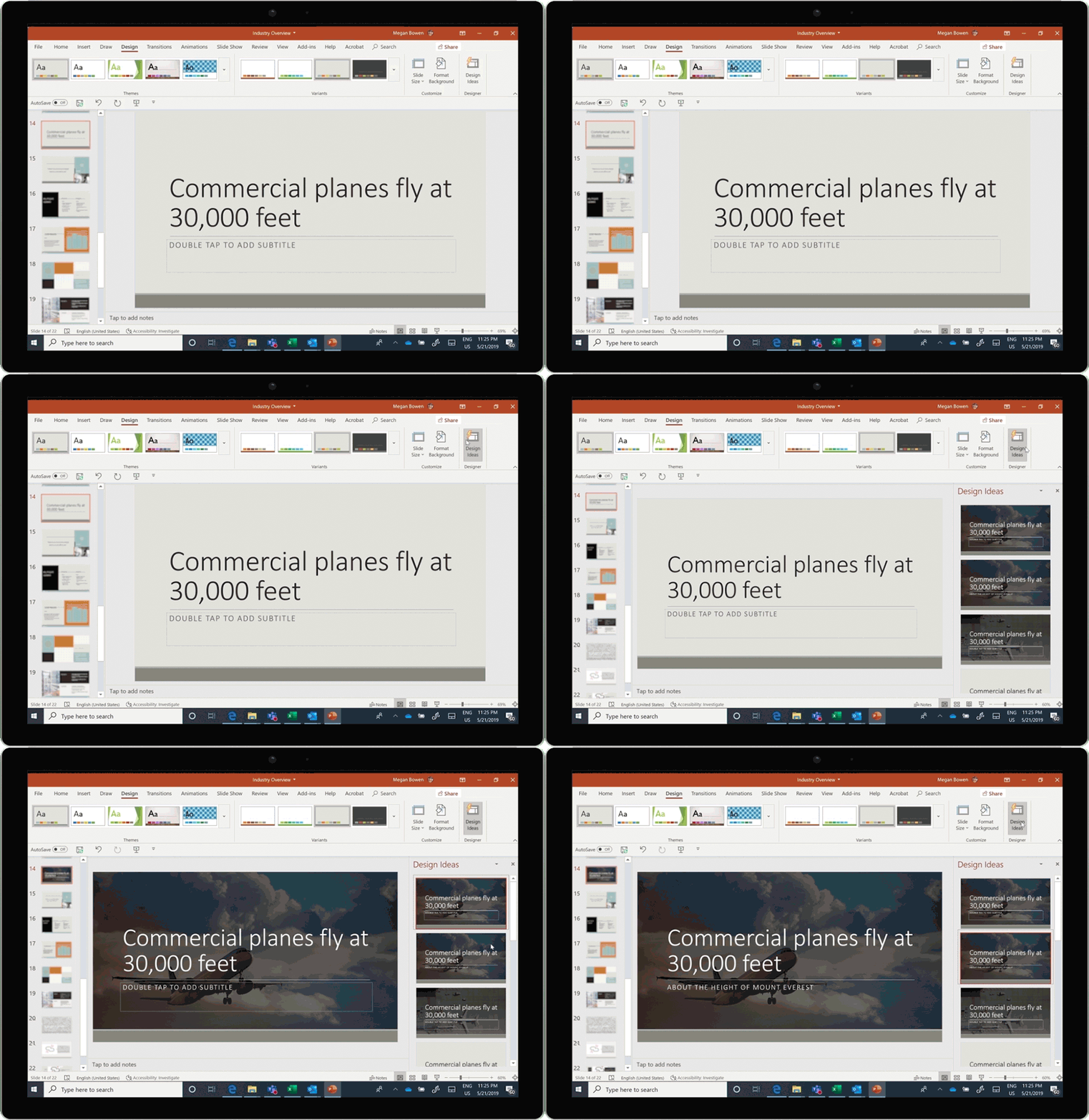
New, high-quality features have been added to Microsoft’s Design, with PowerPoint Designer theme ideas—encouraging users to increase the quality of their content—and Designer perspective, which makes content more understandable, and thereby delivers your message with the intended impact.

RelatedThe Anatomy of a Successful Conference Website

A few years ago, Microsoft used artificial intelligence to create PowerPoint Designer, which helps users by suggesting slide designs to create effective PowerPoints. What started as a tool to simply create compelling photo slides turned into one that generates slides that are more visually helpful, such as process diagrams and timelines; more recently, Microsoft started complementing text with iconography.

Designer for Branded Templates

Branding consistency is everything. With intelligent recommendations for branded templates, Design recommends designs—using your company’s color, font and layout—that are in line with your brand’s image.

Using the content on the slides, these design suggestions are created directly from the layouts in Slide Master. Much time will be saved, as users will receive suggestions when working with their company’s templates, rather than spending time trying to improvise slides.

Create Remarkable Slides

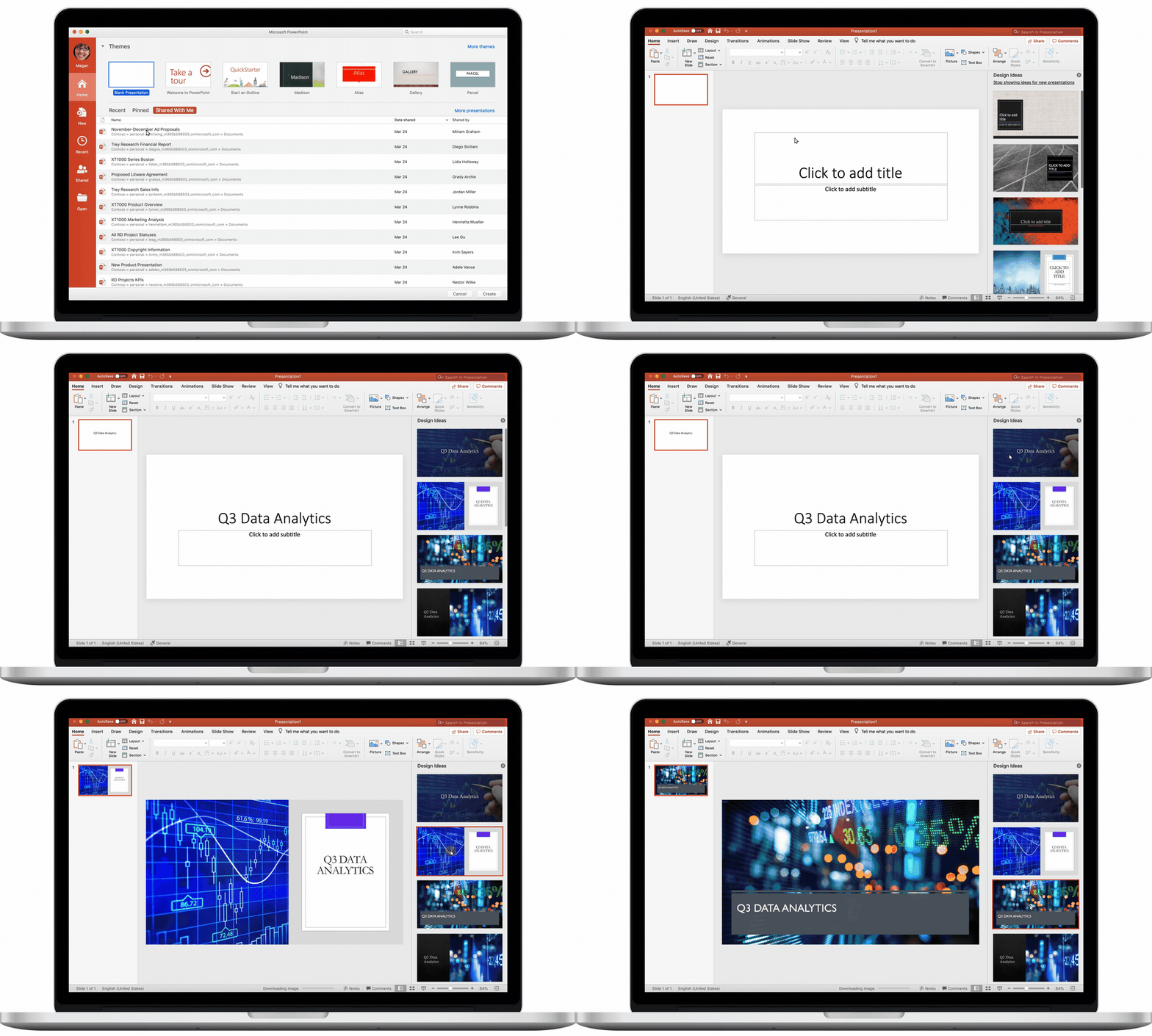
Design theme ideas work just as well, even if you don’t have a branded template. When starting on a blank presentation, Design will use the provided text to recommend high-quality images for your slides, as well as theme styles and colors.
Make Information Easier to Digest

Discussing large numbers in a presentation doesn’t give your audience much of a conception of the scope you’re trying to convey. Studies conducted by Microsoft Research have shown that adding relatable references for large numerical values makes the information easier to digest and retain.

With Microsoft’s Perspective Engine, Designer can detect when a slide has a large value that might be difficult to conceptualize and will suggest a relatable perspective to complement the text, placing the value into a context that’s easier to understand.
Give Better Presentations

Public speaking is a very useful skill, but it takes years of practice to become proficient. Constructive criticism also plays a crucial hand in helping people learn and gain confidence to speak in front of large crowds. Presenter Coach can help users enhance their presentation skills. Grounded in academic research and field studies, Presenter Coach uses the best practices Microsoft has observed to make your presentation more efficient.

More7 Tips to Make the Most Impactful PowerPoint Presentation

With this feature, users can enter rehearsal mode and receive real-time tips about pacing, and use of filler words and culturally insensitive language; it will even tell you when you’re reading directly from the slides. At the end of each session, a report with details for further practice is provided. Presenter Coach for the web will be available later this summer.

Meetings and hospitality technology provider, Cvent, released Cvent Community at its annual conference, Cvent CONNECT. The Community is a forum that fosters peer-to-peer engagement where planners and product users can share their knowledge and best practices, while they learn how to better engage with the Cvent solutions and educational resources.

Cvent Community offers professionals an open online space to discuss ideas and learn from other professionals. In addition to peer-to-peer discussion and best practice sharing, Cvent Community offers:

  • Training and education: Find often-searched help topics and access training resources.
  • Product updates: Stay informed about Cvent product features and enhancements.
  • Customer support: Quick access to the Cvent support team and past support cases.

“The Community is a direct result of the feedback and suggestions our customers have provided—it’s truly built by our customers, for our customers,” said Stacey Fontenot, vice president of marketing at Cvent. “While nothing beats the power of meeting face-to-face, we’re proud to offer our customers the unique opportunity to enjoy a similar ‘live’ experience in an online forum. We look forward to continuing to enhance and expand the Community offerings with input from those who matter most: our customers.”

audio software

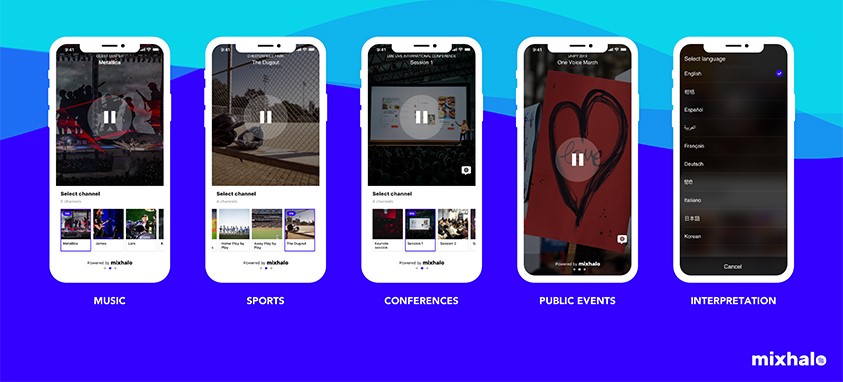
Attendees will now have front-row quality audio from anywhere in the venue, thanks to a recent expansion of live event audio software company Mixhalo. The real-time audio platform, which began as a way to deliver high-quality audio for venues and event organizers, will now offer the service at concerts, conferences, festivals, trade shows and more.

“We are democratizing sound at live events,” said Marc Ruxin, CEO of Mixhalo. “Think of it like HD for your ears. HDTV introduced an improved viewing experience that people didn’t even know they were missing. Mixhalo is doing the same for audio at live events: We are creating a new paradigm for the audio experience at venues [and] events.”

MoreHow to Event Tech Like a Pro

Mixhalo’s low cost rids planners of high audio expenses while providing attendees with great sound. All you need is a smartphone, headphones and the free Mixhalo app. Clarity of sound isn’t all the app offers; attendees can access their preferred language or choose different audio channels if a venue is holding several sessions at once.

“We’re solving a problem people don’t know they have,” Ruxin said.

On November 19, IBTM World, one of the world’s largest international events, will host a three-day networking extravaganza, filled with updates on the latest in events, meetings, conferences and technology. Of the immense amount of festivities on the IBTM itinerary, among them is the Tech Watch Award, given to those companies that are working hard to enhance the events experience for attendees and making it more efficient for the professionals in the industry.

With the event just around the corner, IBTM asked the experts—doubling as Tech Award judges—about what they’re most excited about, how tech can improve events and their thoughts on the biggest challenges planners face in the world of event technology.

What the Experts are Excited About

James Morgan, founder of Event Tech Lab, expressed excitement about Rich Communications Services (RCS), which are text- and voice-based chatbots. Morgan believes they will have “a big impact on events in the future.” Referencing a study by Gartner, a research and advisory company, it was projected that by 2020, 75 percent of customer service communications will occur via RCS. “Due to this technological advancement, production costs and attendee satisfaction have increased,” he said.

RelatedSmart Technology is Reshaping the Future of Hotels

Kubify’s Learning Toolbox, which won IBTM’s People’s Choice Tech Watch Award last year, is what Martin Sirk, owner of Sirk Serendipity, is most excited about. He’s less excited about what it is marketed as an ePoster, engagement enhancer and Round Table content, than for what it may do in the future. “The potential of Learning Toolbox to add depth and intelligence to any delegate-to-delegate interaction is enormous,” he said. “I can see it being used in all kinds of innovative ways by smart meeting organizers; and it is very user-friendly.”

More3 Companies Score Big at IBTM World’s Tech Watch Awards

How Tech Can Improve Events

“The best event technologies take human psychology in account,” said Sirkin. Event tech has numerous benefits, among them are helping the less socially adept to network and create connections, merging behavior with event programs to spark greater engagement and adapting to the different learning styles of attendees.

Data, one of the most sought-after currencies by companies large and small, was also mentioned by Sirk. “Some extremely valuable technologies help organizers manage and exchange an overwhelming volume of data gathered at events, as well as analyze this data through identifying patterns and predicting behaviors, which later can provide opportunities for improvement,” Sirk said.

Are Organizers Making the Most of It?

According to Morgan, event technology deployment is based on three factors: which technology will suit an audience, the organizer and their client’s willingness to embrace technology, and the event’s budget for event technology. External factors, such as Wi-Fi quality and device connectivity, can also greatly affect the use of technology during an event.

Sirk believes that most planners don’t make the best use of new technology. There are numerous reasons, he says: “Firstly, there is a fear of failure, which inhibits experimentation; secondly, many organizers seek technological solutions that fit into their existing event model, rather than taking risks and recognizing that technologies could provide an opportunity to reinvent an event; thirdly, few organizers understand the psychology of their delegates, so they can’t judge which technologies would have the best potential to enhance an event; or they omit to see the difference between an online experience and live events.”

Technology moves at a much faster rate than event planners can adapt, that’s where a big problem lies, according to Corbin Ball, founder of Corbin Ball & Co. Given the rate at which technology moves, planners are hesitant to adopt new technologies for tasks, such as delegate vetting, lest they turn out to be a waste of time. “Technology choices should be made based on organizers’ goals of improving the event in measurable ways, as opposed to choosing the newest, flashiest product,” Corbin added.

event_sponsor

Understanding who attends the event you are sponsoring and aligning your overall business strategy and goals with organizers is crucial to getting your message to attendees. Carefully selecting an event you participate in can provide great rewards for your business, including brand engagement and awareness, targeted marketing that connects you with a specific audience and it can also strengthen a company’s commitment to a cause. Continue reading “4 Things to Consider When Sponsoring an Event”

mobile even -appAlthough mobile event apps can save planners big money on printing costs, there are drawbacks: they tend to be costly; there is ordinarily a four-to-six week development timeline; and since mobile apps are largely a disposable technology, many planners limit their use to just mega events.

This is unfortunate, because smaller meetings with smaller budgets can also benefit from mobile apps. Experts believe, however, that some things need to change before the industry will fully embrace and adopt the technology for all size events.

-The mobile app development process needs to be expedited
-The apps themselves need to be more flexible
-The cost needs to drop significantly.

Re-Use, Recycle

One solution is that companies should insist that their mobile apps be built on a framework that permits the core technology to be reusable. Ask the mobile app provider to come up with a basic design that you can easily recycle, adding in custom features relating to each new event.

This will significantly cut the lead time it takes to create a mobile app, which is important for time-pressed planners who generally have just about four weeks to bring an event to fruition. Today, the average customized mobile app takes a provider 4 to 6 weeks to deliver. Using a design template that has already been pre-approved will significantly shorten the timeline to bring the finished product to fruition.

An added bonus of re-using the framework is that it offsets the original price paid to develop the app, thus making the technology affordable for smaller events. Just make sure the app provider keeps the pricing structure transparent.

advanced apps

Say goodbye to cumbersome expense reports and inefficient in-boxes. With these six advanced mobile apps, never waste another minute searching for lost documents or organizing projects. Today’s intuitive technologies will keep you one step ahead of the crowd and closer to the future of work.

1. Trello is a simple, yet powerful tool to virtually organize your projects. Create whiteboards and card-based to-do lists with photos and videos you can invite others to view and comment on. With easy sharing features, delegate tasks or work on personal projects.J

2. Just like renting a Zipcar, rent out office space for a fixed amount of time through Breather. This advanced mobile app lets you meet with a client or find a quiet space to respond to emails between appointments. Spaces with Wi-Fi, power plugs and charging docks are available for a half hour at a time. It is currently offered in New York, San Francisco, Montreal and Ottawa, with more cities on the way.

3. Canvas is an impressive advanced mobile app that puts more than 5,000 prebuilt forms literally at your fingertips. From invoices and expense reports to checklists and work orders, customize your forms on the go. Additional features include signature capturing and cloud synchronization.

4. On the surface it looks like a mundane word processor and spreadsheet app. But dig deeper and Quip offers collaborative features that are even better than Google Docs. Work on documents at the same as co-workers, and keep in touch with a real-time chat system. You can also access various cloud storage services and export them into Word, PDF and Excel formats.

5. For all of those virtual storage and email services, CloudMagic ties them all into one cohesive advanced mobile app with multiple features. Streamline your corporate email, Gmail, Yahoo or iCloud, and save messages with note-taking, list-making and CRM services.

6. Drupe synchronizes your contacts and organizes them into whatever app you normally use to communicate. For example, add work colleagues to email, Skype for family or Facebook for another. Even standard phone calls get their own folder.

Multi Language AppsEvent apps keep getting easier, a boon for those who are, to put it delicately, tech-averse. Event app-maker Attendify just announced that their apps now support eight languages, including Dutch, English, French, German, Italian, Portuguese, Russian and Spanish.

The multi-language event apps automatically detect the language preference of attendees by aligning with the settings on their phones, so there is nothing to set up or configure. Planners and event organizers can add content to the Attendify app in any of the supported languages,  and the Attendify Hub will present it to the attendee in their preferred (supported) language, after they download the app. How cool is that?

The content is not automatically translated – which you wouldn’t want anyway, to avoid misunderstandings and wrong information. If event organizers need to support two languages in one app, they can add multiple sections of content (for example, two schedules) and add content in each language.

Attendify says “many more” languages will be available in the coming months.

The company, founded in the Ukraine in 2012, is not the first event app-maker to enter multi-language territory. For example, QuickMobile claims to have developed the first multilingual event app back in 2013. EventMobi, GenieConnect and EventPilot are some of the others with multi-language capabilities.

AppBurst offers native mobile event apps supporting multiple languages on iPhone, iPad, and Android. In addition to English, French, German, Italian, Russian and Spanish, it supports Turkish.

Given that we’re pretty much all operating in a global and multicultural setting now, the more app makers  who can present information and connections in different languages, the better. AppBurst’s web page notes that “many attendees at an international event based primarily in English may also feel more comfortable with menus and other functions of the event app in their native language, or perhaps a selection of important content–supplied by the event hosts–available in multiple languages.”

It’s a bottom-line issue as well: As the 2014 survey by Double Dutch and Meetings Professional  International pointed out, it’s estimated that roughly $500 billion is spent annually on events worldwide; events make up the biggest portion of an average B2B marketer’s budget at nearly 20 percent of their overall spending.

wearable technology

What can wearable technology do for your event? So far our notion of wearable event technology includes Fitbits and Apple Watches—one has no use for events and the other is too expensive to provide.

Nevertheless, wearable devices intrigue many people—try mentioning wearables to a millennial and watch their eyes grow wider. So how can you bring this excitement and buzz to your event? And what functionality does wearable technology have? Limefy will be launching LiGo, a wearable device and event app. We found a few unique ways wearable technology can significantly improve your event.

1. Redefine Networking

People act on certain emotions. Jonah Berger, author of Contagious, states that awe, excitement, and amusements are the top three positive emotions that drive people from thinking about something to actually doing it. Applying this concept to business networking, we see that people need an in-the-moment, emotional push to go from planning to network to actually networking. The question is how can we plan an emotion?


Like this content? Click here to get it Delivered FREE to your Inbox or your Mailbox

Wearable devices such as LiGo appeal to amusement. The device can be programmed with user profiles, which are used to find matches based on interest.  As people navigate the event and a match occurs, the wearable device lights up for both people and sends a notification that a match has occurred. Viola! The perfect icebreaker. That slightly awkward moment when both people look at each other leads them to engage with the person. Not only do attendees find people they should be talking to right away, but they are more likely to talk to them with the help of wearables.

2. Real Time Data

Wearable technology collects a lot of real time data. As people navigate through the event, the device tracks which part of the event people tend to gravitate to, how much time they spend there and how they interact with different exhibitors and sponsors. With this information, event organizes can send out promotional push notifications and messages to attendees to visit a specific area. This opens up the door to new sponsorship opportunities and better control of the crowd, which leads to a custom, tailored user-experience.

3. Gamification Scenarios

Another buzz word in the event industry is gamification. We see a huge potential in leveraging gamification scenarios to create unique event experiences. Wearable devices can track movements and locations to unlock different rewards and achievements based on the person’s behavior. The element of amusement and curiosity comes to play here. This helps sponsors and exhibitors attract people to their product. LiGo is programmed with a person’s profile to unlock targeted and tailored gamification experiences to help sponsors find qualified leads.

This is just the tip of the iceberg for what wearable technology can do for events. The main takeaway here is that wearable devices work because they add a new element of emotions. The feeling of amusement and excitement gives people the push they need in order to start interacting at events, instead of just attending them.


ligo logo 1.1Maria Trizna is a strategic marketing manager for Limefy.


Airhelp aids inconvenienced travelersTravelers inconvenienced by airline delays, cancellations or overbooked flights can turn to AirHelp for assistance. The company’s mission is to get them the compensation they are legally entitled to, but rarely collect.

Sara Ashley O’Brien reports on CNN.com that more than 26 million people experience airline grievances every year. Although more than 8 million are eligible for compensation, less than 2% get the money they’re entitled to. And in many cases, fliers accept less than they are actually entitled to.

How AirHelp Works

AirHelp was founded in Copenhagen in 2013 and now operates in 17 countries. The company takes a 25% cut of the payout they secure for clients. If they are unsuccessful, the client pays nothing. On average, AirHelp secures $450 per claim for its customers. Since its launch, AirHelp has helped customers collect $15 million. The largest payout thus far was $19,000 for 29 high school students from Copenhagen.

Customers enter basic flight information data to AirHelp’s app or website. Within minutes, the company’s automated system can determine if the passenger would be eligible for compensation from an airline. If the claim is valid, it can take anywhere from a month to 10 weeks to receive payment.

AirHelp co-founder Nicolas Michaelsen told O’Brien, “Sometimes we get the money after two minutes. Sometimes we have to go to court to get it.”

For this reason, the company has 15 lawyers on its payroll. “When we open up a new country, we have to take a number of claims to court to show we’re there and we mean business. Then when that’s done, they respect [AirHelp] more,” Michaelsen told O’Brien.

Michaelsen points out that airline carriers, who currently owe passengers $10 billion in backlogged claims, could actually use AirHelp to help validate the claims, many of which have been languishing for three years.

Since its inception, tech-savvy AirHelp has compiled a mass of data. The company has found that the most problematic flight routes are from John F. Kennedy International Airport (JFK) to London Heathrow Airport (LHR), and Rome Fiumicino Airport (FCO) to John F. Kennedy International Airport (JFK). According to AirHelp data, Ryan Air has had the most claims filed against them. Jet Blue is the only carrier that mentions compensation in its contract of carriage.

Join 54,000 of your peers who have subscribed to Smart Meetings magazine – FREE!